Someone recently asked me if Liberty BASIC can answer the question about whether a date is between two other dates. Yes it can!
The following is my quick solution to his question.
answer = isDateBetween("12/21/2015", "12/15/2015", "12/30/2015")
if answer then print "yes" else print "no"
answer = isDateBetween("11/21/2015", "12/15/2015", "12/30/2015")
if answer then print "yes" else print "no"
function isDateBetween(aDate$, firstDate$, lastDate$)
aDays = date$(aDate$)
firstDays = date$(firstDate$)
lastDays = date$(lastDate$)
isDateBetween = firstDays < aDays and aDays < lastDays
end function
Enjoy!
Friday, January 15, 2016


Thursday, January 14, 2016
Tiny BASIC part 5 - Adding color to PSET
It's much more fun to draw in color than with only a black pen, so let's add a third parameter to the PSET statement for color, for example:
The way this works is that it will look for a comma and a string expression after it sets PSETX and PSETY. If there is no comma it will skip over the part that gets a color parameter, so the default color will be black in that case.
The string will be the name of a valid Liberty BASIC color, for example red, blue, green, black, etc. The following code is stolen from the routine that parses for the PRINT statement. In a later post we will incorporate this into the PRINT code by calling it as a subroutine so that we won't have the same code twice.
So we call the [GetStringLiteral] subroutine and check E$ for an error. If there is none then we set PSETCOLOR$ to the value of B$ as shown here.
GOSUB [GetStringLiteral]
IF E$ <> "" THEN [Ready]
PSETCOLOR$ = B$
END IF
#GWIN "color "; PSETCOLOR$
Then we add a drawing command like so to set the color:
#GWIN "color "; PSETCOLOR$
Here is a sample that uses PSET with color!
And here is a screenshot!
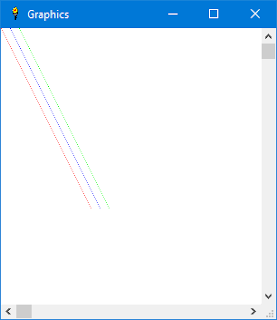
PSET x, y, "color"To do this we need to add some code to our case "pset" block:
CASE "pset"
IF GWINOPEN = 0 THEN
E$ = "PSET error - Graphic window is not open"
GOTO [Ready]
END IF
GOSUB [GetExpression]
IF E$<>"" THEN [Ready]
PSETX = N
GOSUB [GetChar]
IF C$ <> "," THEN
E$= "Comma expected after x parameter"
GOTO [Ready]
END IF
C = C + 1
GOSUB [GetExpression]
IF E$<>"" THEN [Ready]
PSETY = N PSETCOLOR$ = "black"
GOSUB [GetChar]
IF C$ = "," THEN
C = C + 1
GOSUB [GetStringLiteral]
IF E$ <> "" THEN [Ready]
PSETCOLOR$ = B$
END IF
#GWIN "color "; PSETCOLOR$
#GWIN "down ; set "; PSETX; " "; PSETY
GOTO [FinishStatement]
The way this works is that it will look for a comma and a string expression after it sets PSETX and PSETY. If there is no comma it will skip over the part that gets a color parameter, so the default color will be black in that case.
The string will be the name of a valid Liberty BASIC color, for example red, blue, green, black, etc. The following code is stolen from the routine that parses for the PRINT statement. In a later post we will incorporate this into the PRINT code by calling it as a subroutine so that we won't have the same code twice.
[GetStringLiteral]
GOSUB [SkipSpace]
GOSUB [GetChar]
IF C$=G$ THEN
B$=""
[NextStringMember]
C = C + 1 : C$=MID$(A$,C,1)
IF C$="" THEN
E$="Unterminated string"
RETURN
ELSE
IF C$<>G$ THEN
B$=B$+C$
GOTO [NextStringMember]
END IF
END IF
C = C + 1 : C$=MID$(A$,C,1)
IF C$=G$ THEN
B$=B$+C$
GOTO [NextStringMember]
END IF
END IF
RETURN
So we call the [GetStringLiteral] subroutine and check E$ for an error. If there is none then we set PSETCOLOR$ to the value of B$ as shown here.
GOSUB [GetStringLiteral]
IF E$ <> "" THEN [Ready]
PSETCOLOR$ = B$
END IF
#GWIN "color "; PSETCOLOR$
Then we add a drawing command like so to set the color:
#GWIN "color "; PSETCOLOR$
Here is a sample that uses PSET with color!
5 graphicwin
10 pset x, y, "red"
20 pset x + 10, y, "blue"
30 pset x + 20, y, "green"
40 x = x + 1
50 y = y + 2
60 if x < 100 then goto 10
And here is a screenshot!

Wednesday, January 13, 2016
Liberty BASIC file type association
Liberty BASIC doesn't map the BAS file extension to itself when it is installed. This is because I didn't want to be so presumptuous as to steal a common file type away from another version of BASIC that might be installed.
So, because there is a bug in Windows which makes it really hard to remap a file extension and there have been discussions about this in the Liberty BASIC forum at conforums.com one of our member Chris Iverson (thanks Chris!) has contributed some Liberty BASIC code to solve this problem.
Click to see thread in the forum
Enjoy!
So, because there is a bug in Windows which makes it really hard to remap a file extension and there have been discussions about this in the Liberty BASIC forum at conforums.com one of our member Chris Iverson (thanks Chris!) has contributed some Liberty BASIC code to solve this problem.
Click to see thread in the forum
Enjoy!
Sunday, January 10, 2016
Lunar lander revisited
Liberty BASIC comes with a nice introduction to video games called lander.bas.
- It's a good example of a timer driven game.
- It uses sprites which are actually generated on the fly using turtle graphics.
- It also shows proper technique of structured programming.
So I have some ideas that I am thinking about implementing to update it and make it an even more complete video game example:
- Add sound effects including ambient sounds, rocket motor noise and crash explosion.
- Animate the rocket motor so you can see rocket exhaust coming out.
- Add some flying space junk sprites that you need to avoid while trying to land.
- Add a colored starfield in the background.
Looking forward to this! Check back for updates!
Friday, January 08, 2016
Tiny BASIC part 4 - Adding a PSET statement
Okay, now we are ready to add a PSET statement for drawing pixels. Today we will simply add the ability to draw a single black pixel at a time. Next time we will add color!
Here is the code to accomplish this. This is just another SELECT CASE block to add after the one we added for the GRAPHICWIN command.
This was a bit tricky to write because there isn't really any documentation with the original Tiny BASIC source code, but by looking at the code for the other statements I think I figured it out correctly. It does seem to work.CASE "pset"
IF GWINOPEN = 0 THEN
E$ = "PSET error - Graphic window is not open"
GOTO [Ready]
END IF
GOSUB [GetExpression]
IF E$<>"" THEN [Ready]
PSETX = N
GOSUB [GetChar]
IF C$ <> "," THEN
E$= "Comma expected after x parameter"
GOTO [Ready]
END IF
C = C + 1
GOSUB [GetExpression]
IF E$<>"" THEN [Ready]
PSETY = N
#GWIN "down ; set "; PSETX; " "; PSETY
GOTO [FinishStatement]
The syntax for the new statement is PSET x, y
Let me explain what it does.
- First check to see if the graphic window is open. If it isn't then set E$ to be an error string. Then GOTO [Ready]. This will display the error.
- Then get the next expression using GOSUB [GetExpression]. This unleashes the expression parser which is easily the largest and most complex part of the Tiny BASIC source code. Then it checks for an error using IF E$<>"". If E$ does contain an error, then GOTO [Ready].
- Okay so got this far, so set PSETX to be what was in N, which is the result of the call to [GetExpression].
- Now get the next character, which we expect to be a comma to separate the x and y values. If the next character is not a comma, set E$ to be an error and GOTO [Ready].
- Now advance C one character by adding 1 to it. We do this because we found the expected comma, and now we need to skip over that so that we can get the next expression for our y value.
- Get the next expression using GOSUB [GetExpression]. Test E$ for an error and GOTO [Ready] if there is one.
- Get the value of N and put it into the variable PSETY.
- Finally, draw the pixel in the graphics window!
Here is the sample Tiny BASIC program that uses the PSET statement:
10 graphicwin
20 pset x, y
30 x = x + 1
40 y = y + 2
50 if x < 200 then goto 20
And here is the output of the program!

Thursday, January 07, 2016
Run BASIC Revisited - The easiest web development system on Earth
I got an inquiry yesterday about Run BASIC asking about what is special about it. The essential concept is that it is an all-in-one BASIC web application server. You can use it to create a dynamic web site, or to host in-house applications for your business or school, or use it to control your home. The possibilities are pretty much endless.
Here is a link to a white paper about Run BASIC.
http://www.libertybasic.com/RunBASICBreakthrough.pdf
Here is a link to the Run BASIC community forum.
http://runbasic.proboards.com/
Here is a link to a white paper about Run BASIC.
http://www.libertybasic.com/RunBASICBreakthrough.pdf
Here is a link to the Run BASIC community forum.
http://runbasic.proboards.com/
Wednesday, January 06, 2016
Tiny BASIC part 3 - Adding GRAPHICWIN statement
We are going to add GRAPHICWIN and PSET statements to Tiny BASIC.
Let's start with the really easy one. We will add a case "graphicwin" block to the end of the select case blocks that we examined in the last post. Here is what it looks like. The new code is in bold red.
CASE "let"So when you run Tiny BASIC and type the command graphicwin and press Enter it will open a small graphics window. When it does this it also sets the GWINOPEN flag to 1 to that we can check it if the program tries to open another graphics window. Only one graphics window will be allowed at a time.
GOSUB [GetLabel]
IF E$<>"" THEN [Ready]
CASE "graphicwin"
IF GWINOPEN = 1 THEN
PRINT "Graphics window is already open."
ELSE
GWINOPEN = 1
OPEN "Graphics" FOR graphics AS #GWIN
END IF
GOTO [FinishStatement]
END SELECT
The other thing that we want to do it close the graphics window and reset GWINOPEN to 0 if the program is started using the RUN statement.
So, we need to add the following code into the case "run" block. Here is how that code should look. The new code is in bold red.
CASE "run"So now the program will always start off in a clean state each time it is run!
IF GWINOPEN = 1 THEN
CLOSE #GWIN
GWINOPEN = 0
END IF
FOR I=27 TO 52 : A(I)=0 : NEXT I
L=27 : C=1
GOTO [FinishStatement2]
In our next post we will figure out how to add a PSET statement so we can draw some graphics!
Monday, January 04, 2016
Tiny BASIC part 2 - Adding new statements
This is part 2 of a series on extending tiny basic.bas which is an example that comes with Liberty BASIC v4.5.0.
In order to add some graphics capability I want to suggest two new commands just to start.
GRAPHICWIN width, height and PSET x, y, color$
These will enable us to open a window to draw in, and also to draw pixels of a specific color at a given x, y position. This will be a crude start, but it will be instructive because it will show the reader how to extend Tiny BASIC to do what is desired.
The first thing to do is figure out where in the code Tiny BASIC parses commands so we can add some more. The code below is the routine that does this. If you look carefully you will see a SELECT CASE statement and then a CASE statement for each Tiny BASIC command.
More later.
In order to add some graphics capability I want to suggest two new commands just to start.
GRAPHICWIN width, height and PSET x, y, color$
These will enable us to open a window to draw in, and also to draw pixels of a specific color at a given x, y position. This will be a crude start, but it will be instructive because it will show the reader how to extend Tiny BASIC to do what is desired.
The first thing to do is figure out where in the code Tiny BASIC parses commands so we can add some more. The code below is the routine that does this. If you look carefully you will see a SELECT CASE statement and then a CASE statement for each Tiny BASIC command.
More later.
[NextStatement]
GOSUB [GetLabel]
IF E$<>"" THEN [Ready]
SELECT CASE D$
CASE "if"
GOSUB [GetExpression]
IF E$<>"" THEN [Ready]
IF N<1 font="" then="">
B$=A$(L) : C=LEN(B$)+1
GOTO [FinishStatement]
END IF
GOSUB [GetLabel]
IF E$<>"" THEN [Ready]
IF D$<>"then" THEN
E$="'THEN' expected"
GOTO [Ready]
END IF
GOTO [NextStatement]
CASE "rem"
B$=A$(L) : C=LEN(B$)+1
GOTO [FinishStatement]
CASE "input"
GOSUB [GetVar]
IF E$<>"" THEN [Ready]
INPUT N : A(V)=N
GOTO [FinishStatement]
CASE "print"
[Print]
GOSUB [SkipSpace]
GOSUB [GetChar]
IF C$=G$ THEN
B$=""
[NextChar]
C = C + 1 : C$=MID$(A$,C,1)
IF C$="" THEN
E$="Unterminated string"
GOTO [Ready]
ELSE
IF C$<>G$ THEN
B$=B$+C$
GOTO [NextChar]
END IF
END IF
C = C + 1 : C$=MID$(A$,C,1)
IF C$=G$ THEN
B$=B$+C$
GOTO [NextChar]
END IF
PRINT B$;
ELSE
GOSUB [GetExpression]
IF E$<>"" THEN [Ready]
B=N1
IF B=N THEN
PRINT N;"*";
ELSE
PRINT N;
END IF
END IF
GOSUB [SkipSpace]
GOSUB [GetChar]
IF C$="," THEN C = C + 1 : GOTO [Print]
GOSUB [SkipSpace]
GOSUB [GetChar]
IF C$<>";" THEN
ELSE
C = C + 1
END IF
GOTO [FinishStatement]
CASE "clear"
FOR I=27 TO 52 : A(I)=0 : NEXT I
GOTO [FinishStatement]
CASE "run"
FOR I=27 TO 52 : A(I)=0 : NEXT I
L=27 : C=1
GOTO [FinishStatement2]
CASE "goto"
GOSUB [GetExpression]
IF E$<>"" THEN [Ready]
IF E>=N THEN L=27
C=1 : T=N
[NextGoto]
IF L=126 THEN
E$="Line not found"
GOTO [Ready]
END IF
GOSUB [GetNumber]
IF N=T THEN E=N : GOTO [NextStatement]
L = L + 1 : C=1
GOTO [NextGoto]
CASE "new"
FOR I=27 TO 125 : A$(I)="" : NEXT I
FOR I=27 TO 52 : A(I)=0 : NEXT I
IF E=0 THEN [FinishStatement]
GOTO [Ready]
CASE "cls"
CLS : GOTO [FinishStatement]
CASE "help"
FOR I=9 TO 18
B$=A$(I) : PRINT B$
NEXT I
GOTO [FinishStatement]
CASE "mem"
B=126
FOR I=27 TO 125
diffI = 152 - I 'Cheating here
B$=A$(diffI) : IF B$="" THEN B=diffI
NEXT I
B=126-B : PRINT B;"*";
PRINT " lines free"
GOTO [FinishStatement]
CASE "end"
GOTO [Ready]
CASE "bye"
GOTO [ExitTinyBAS]
CASE "list"
GOSUB [GetNumber] : T=N : A=L : I=C
IF T=0 THEN
GOSUB [GetLabel]
IF E$="" AND D$="pause" THEN I=C
E$=""
END IF
FOR L=27 TO 125
C=1 : GOSUB [GetNumber]
B=(T=0) OR (N=T)
IF B=TRUE THEN
IF A$<>"" THEN
PRINT A$
IF D$="pause" THEN
B = (L-26) mod 10
IF B=0 THEN PRINT "Pause..."; : INPUT AAA$
END IF
END IF
END IF
NEXT L
L=A : C=I
GOTO [FinishStatement]
CASE "save"
PRINT "SAVE, TBD"
CASE "load"
PRINT "LOAD, TBD"
CASE "let"
GOSUB [GetLabel]
IF E$<>"" THEN [Ready]
END SELECT
Thursday, December 31, 2015
More on getting started with Liberty BASIC
In addition to the resources I mentioned the other day, please do not overlook our great online community of users.
There are two large forums where you can learn a lot from friendly, knowledgeable people about all kinds of things.
First the forum at Conforms. This great forum is organized by topic, which is really nice. Here's the link:
http://libertybasic.conforums.com
Secondly there is Yahoo Groups! What's nice about this site is that you can subscribe to get emails, and you post to the group by email. Here is the link:
http://groups.yahoo.com/group/libertybasic
People do amazing things with Liberty BASIC, and these are the places where these people hang out.
See you there!
There are two large forums where you can learn a lot from friendly, knowledgeable people about all kinds of things.
First the forum at Conforms. This great forum is organized by topic, which is really nice. Here's the link:
http://libertybasic.conforums.com
Secondly there is Yahoo Groups! What's nice about this site is that you can subscribe to get emails, and you post to the group by email. Here is the link:
http://groups.yahoo.com/group/libertybasic
People do amazing things with Liberty BASIC, and these are the places where these people hang out.
See you there!
Tiny BASIC revisited
Liberty BASIC comes with an implementation of Tiny BASIC which is extremely similar to the BASIC that came with the old Radio Shack TRS-80. Remember that computer? Some of us do. :-)
This is a very limited version of BASIC, but it has some strengths.
This is a very limited version of BASIC, but it has some strengths.
- Simplicity - Not much to learn
- Interpreted - This is an interactive interpreter
- Source code - You can modify the language
So, since Tiny BASIC can be modified by pretty much anyone who knows a little BASIC, I am starting a series where I will extend the language and show how to do it.
First we will focus on graphics! More to come so stay tuned!
Wednesday, December 30, 2015
Doing pixel manipulation in Liberty BASIC
One of the members of the Liberty BASIC community posted a cool example of doing pixel graphics in Liberty BASIC. It is instructive because it is short and it shows how to effectively use Windows API calls to work with graphical images.
Here is a link to the post including a code example and a screenshot of the output.
Tuesday, December 29, 2015
How to get started with Liberty BASIC
I got an email today from someone who was frustrated trying to figure out how to get started with Liberty BASIC. This seemed like good blogging material. :-)
Here is a start on the subject of getting started.
Try it - Download the trial software and install it. It works on pretty much all versions of Windows that run on laptops and desktop PCs. We don't support Windows Server but it may run.
Here's the download link http://www.libertybasic.com/download.html
Liberty BASIC comes with a tutorial. Once you start up Liberty BASIC look at the Help menu for the tutorial and the help documentation
There is a softcover book that you can purchase at Amazon's site.
Here is the link for the book:
http://www.amazon.com/Beginning-Programming-Liberty-BASIC-Gundel/dp/0557228115
Here is a start on the subject of getting started.
Try it - Download the trial software and install it. It works on pretty much all versions of Windows that run on laptops and desktop PCs. We don't support Windows Server but it may run.
Here's the download link http://www.libertybasic.com/download.html
Liberty BASIC comes with a tutorial. Once you start up Liberty BASIC look at the Help menu for the tutorial and the help documentation
There is a softcover book that you can purchase at Amazon's site.
Here is the link for the book:
http://www.amazon.com/Beginning-Programming-Liberty-BASIC-Gundel/dp/0557228115
Monday, December 28, 2015
New features of Liberty BASIC v4.5.0
This exciting new release of Liberty BASIC increases memory available 14x over the previous version, adds new string functions, the ability to fetch web pages, and new code editor enhancements. Download your copy now! Click here.
New features of Liberty BASIC v4.5.0
New features of Liberty BASIC v4.5.0
- Memory space raised to 1GB from 70MB
- Ctrl+click on a branch label or SUB name to jump to that place in the code
- Double click on a variable name or handle to highlight other occurences of that item in yellow
- New httpget$() function so now you can get a file from a webserver without API calls
- New string functions make it easier to do some things and with faster performance.
- upto$(sourceString$, search$
- after$(sourceString$, search$
- afterlast$(sourceString$, search$)
- endswith(sourceString$, search$)
- remchar$(sourceString$, removeThese$)
- Removed arbitrary limitations on the baud rates that can be specified when opening a serial port.
- Upgraded to NTPort v2.8 from v2.3 to add compatibility for 64-bit versions of Windows.
- The Liberty BASIC editor now remembers its size and location when you start LB.
- Added a filter bad characters feature in the LB editor help the compiler, especially when code is pasted in from a web browser.
- Increased the FILEDIALOG length of the file path from 128 to 260 which is the Windows file dialog maximum path length.
- Added FIND, FINDBACK, and RESETFIND commands to the text window and texteditor control.
- Added !backcolor and !forecolor commands to texteditor controls and text windows
- Several bug fixes
Thursday, October 18, 2012
Referral Campaign - Win a free copy of Liberty BASIC!
Until the end of October 2012 we are running a word of mouth referral campaign. For a free copy of Liberty BASIC, refer at least 5 friends with an interest in programming. If you want to qualify for the free copy, your friend need to send an email to freeoffer@libertybasic.com and mention that you referred them. They must include your name and email address. We will send you a download link and registration code. Please try to refer friends that you think would be interested in Liberty BASIC. Thanks!
Wednesday, October 03, 2012
Regarding How to Teach Programming
Andres Valloud posted "...The goal of this improved teaching is to allow everyone to take advantage of programming, not just CS oriented people..."
http://blogten.blogspot.com/2012/10/regarding-how-to-teach-programming.html
Friday, April 27, 2012
Before Make Magazine
In the corner of the factory there was a rather large machine sitting there unused. There was a sort of hodgepodgeness (if that's a word) about it. My boss Bob explained to me that this was a CNC machine that he had built himself. Wow! So before the company had money to purchase the industry standard Excellon drilling and routing machines he had decided it was possible to build his own, and it worked. I think that's really impressive!
Tuesday, April 03, 2012
BASIC for the Raspberry Pi?
What's Raspberry Pi? It is a cool new single board computer about the size of a credit card. It runs Linux (it can run other things) and it only costs $35, or $25 if you don't care about networking. You only need a micro USB charger or batteries to power it, a keyboard and mouse, and an HDMI compatible monitor or TV set.
This new device is aimed at schools, but the appeal of such a device is obviously very broad. I went to their forum and mentioned the idea of producing a version of BASIC for the RP. The reactions were mixed. Seems like that crowd is strongly committed to Python. That's okay, I've got my hands full right now with Liberty BASIC and Run BASIC.
Perhaps in the future I will have a chance to do something. It would probably be my first open source project, based on Squeak Smalltalk.
This new device is aimed at schools, but the appeal of such a device is obviously very broad. I went to their forum and mentioned the idea of producing a version of BASIC for the RP. The reactions were mixed. Seems like that crowd is strongly committed to Python. That's okay, I've got my hands full right now with Liberty BASIC and Run BASIC.
Perhaps in the future I will have a chance to do something. It would probably be my first open source project, based on Squeak Smalltalk.
Tuesday, March 13, 2012
The Arduino Phenomenon
Seems like there is a lot of interest lately in using microcontrollers such as the BASIC Stamp and the new Arduino products. To my surprise, even a long retired electrical engineer friend knew about Arduino when I asked him. I get email from users of these products asking if they can use Liberty BASIC to program them. The answer is no, and yes.
These devices come with their own programming tools. Liberty BASIC is a Windows only (and soon also Mac and Linux) language, so it cannot be used to program microcontrollers. However I've been told that they have found a use for Liberty BASIC with microcontrollers. Some people have created a GUI control panel (including running graphics for example) for their microcontroller projects using Liberty BASIC because Liberty BASIC can be used to monitor devices using serial, parallel and network ports.
For more information about this, see the following link (you will need to register with the forum to read the posts).
http://libertybasic.conforums.com/index.cgi?board=comport
These devices come with their own programming tools. Liberty BASIC is a Windows only (and soon also Mac and Linux) language, so it cannot be used to program microcontrollers. However I've been told that they have found a use for Liberty BASIC with microcontrollers. Some people have created a GUI control panel (including running graphics for example) for their microcontroller projects using Liberty BASIC because Liberty BASIC can be used to monitor devices using serial, parallel and network ports.
For more information about this, see the following link (you will need to register with the forum to read the posts).
http://libertybasic.conforums.com/index.cgi?board=comport
Saturday, March 12, 2011
Automatic file backup - using a timer
Once our file backup utility is running and our window is open we need to be able to use the start and stop buttons to control the activity of program.
Here is the code for the start action. It ties into the [start] label in the Start button.
When the button is clicked we disable the Start button and enable the Stop button to show which operations are valid. We call [checkInitialFiles] which we haven't written yet (we'll get into that later). We show in the statusLog texteditor that we are starting the backup process. Then we get the contents of the interval textbox and start the timer. The reason we multiply the interval by 1000 is that the timer measures time in milliseconds so if we want 5 a second interval we need to give the timer a value of 5000. Finally we stop and wait for a timer tick or for user interaction.
Once our timer is running we need to be able to stop it. Here is our stop handler:
This is real simple. First thing is to stop the timer with timer 0. Then we reverse the enabling of the Start and Stop buttons. Compare this to the way that [start] does it. Then we log to the statusLog texteditor that we are stopping. Finally we wait.
The purpose of the [checkInitialFiles] subroutine is to create a description of the files we are interested in and the time and date they were last modified. Then each time the timer ticks after this we create a new description of these files. If the date and time changes on any of these files then it's time to make a new backup.
Just for now let's just create an empty [checkInitialFiles] subroutine:
The routine doesn't do anything yet, so we only have a RETURN statement.
Now we'll create a [checkFiles] routine which will be called each time the timer ticks. For now the routine will not do much. We will write the full routine in a later section.
The first thing we do is log the word "tick" to the statusLog. This is for instructive purposes only and will be removed later. We do this so that we can see that the timer is working. After this we disable the timer. This might seem like a strange idea, but the reason we do it is because the next thing we do is check the files to see if they changed (we'll write this part later). If they change we don't want the timer to be running because if it takes a while to backup the files and the timer is still running then the timer events can build up. Once the file check and possible backup are finished we reenable the timer.
The entire listing so far is posted below. Try running it. When you click Start it will begin logging its activity. Notice that the word tick gets logged every five seconds. Click the Stop button and change the interval to 1. Start it again and the logging will happen once per second.
Here is the code for the start action. It ties into the [start] label in the Start button.
[start] 'startup the backup timer
#main.start "!disable"
#main.stop "!enable"
gosub [checkInitialFiles]
#main.statusLog "Starting backup"
#main.interval "!contents? interval"
timer interval * 1000, [checkFiles]
wait
When the button is clicked we disable the Start button and enable the Stop button to show which operations are valid. We call [checkInitialFiles] which we haven't written yet (we'll get into that later). We show in the statusLog texteditor that we are starting the backup process. Then we get the contents of the interval textbox and start the timer. The reason we multiply the interval by 1000 is that the timer measures time in milliseconds so if we want 5 a second interval we need to give the timer a value of 5000. Finally we stop and wait for a timer tick or for user interaction.
Once our timer is running we need to be able to stop it. Here is our stop handler:
[stop] 'stop the backup timer
timer 0
#main.start "!enable"
#main.stop "!disable"
#main.statusLog "Stopping backup"
wait
This is real simple. First thing is to stop the timer with timer 0. Then we reverse the enabling of the Start and Stop buttons. Compare this to the way that [start] does it. Then we log to the statusLog texteditor that we are stopping. Finally we wait.
The purpose of the [checkInitialFiles] subroutine is to create a description of the files we are interested in and the time and date they were last modified. Then each time the timer ticks after this we create a new description of these files. If the date and time changes on any of these files then it's time to make a new backup.
Just for now let's just create an empty [checkInitialFiles] subroutine:
[checkInitialFiles] 'snapshot of filenames and timestamps
return
The routine doesn't do anything yet, so we only have a RETURN statement.
Now we'll create a [checkFiles] routine which will be called each time the timer ticks. For now the routine will not do much. We will write the full routine in a later section.
[checkFiles] 'are there new files
#main.statusLog "tick"
'temporarily disable the timer
timer 0
'perform the check here
'reenable the timer
timer interval * 1000, [checkFiles]
wait
The first thing we do is log the word "tick" to the statusLog. This is for instructive purposes only and will be removed later. We do this so that we can see that the timer is working. After this we disable the timer. This might seem like a strange idea, but the reason we do it is because the next thing we do is check the files to see if they changed (we'll write this part later). If they change we don't want the timer to be running because if it takes a while to backup the files and the timer is still running then the timer events can build up. Once the file check and possible backup are finished we reenable the timer.
The entire listing so far is posted below. Try running it. When you click Start it will begin logging its activity. Notice that the word tick gets logged every five seconds. Click the Stop button and change the interval to 1. Start it again and the logging will happen once per second.
dim info$(10,10)
setupPath$ = DefaultDir$+"\backupsetup.ini"
WindowWidth = 560
WindowHeight = 460
statictext #main, "Files to backup:", 5, 5, 94, 20
texteditor #main.listOfFiles, 5, 26, 530, 95
statictext #main, "Destination folder:", 5, 132, 107, 20
textbox #main.destination, 115, 127, 420, 25
statictext #main, "Backup interval in seconds:", 5, 157, 163, 20
textbox #main.interval, 170, 152, 100, 25
button #main.save,"Save",[save], UL, 495, 152, 42, 25
button #main.start,"Start",[start], UL, 5, 187, 75, 25
button #main.stop,"Stop",[stop], UL, 90, 187, 70, 25
statictext #main, "Backup status log", 5, 217, 106, 20
texteditor #main.statusLog, 5, 237, 530, 160
menu #main, "Edit"
open "Backup Utility" for window_nf as #main
#main.stop "!disable"
gosub [loadSetup]
wait
[loadSetup]
#main.listOfFiles "!cls";
if fileExists(setupPath$) then
open setupPath$ for input as #setup
while filename$ <> "end!"
line input #setup, filename$
if filename$ <> "end!" then
#main.listOfFiles filename$
end if
wend
line input #setup, destination$
#main.destination destination$
line input #setup, interval
#main.interval interval
close #setup
end if
return
[start] 'startup the backup timer
#main.start "!disable"
#main.stop "!enable"
#main.interval "!contents? interval"
gosub [checkInitialFiles]
#main.statusLog "Starting backup"
timer interval * 1000, [checkFiles]
wait
[stop] 'stop the backup timer
timer 0
#main.start "!enable"
#main.stop "!disable"
#main.statusLog "Stopping backup"
wait
[checkInitialFiles] 'snapshot of filenames and timestamps
return
[checkFiles] 'are there new files
#main.statusLog "tick"
'temporarily disable the timer
timer 0
'perform the check here
'reenable the timer
timer interval * 1000, [checkFiles]
wait
'return a true if the file in fullPath$ exists, else return false
function fileExists(fullPath$)
files pathOnly$(fullPath$), filenameOnly$(fullPath$), info$()
fileExists = val(info$(0, 0)) > 0
end function
'return just the directory path from a full file path
function pathOnly$(fullPath$)
pathOnly$ = fullPath$
while right$(pathOnly$, 1) <> "\" and pathOnly$ <> ""
pathOnly$ = left$(pathOnly$, len(pathOnly$)-1)
wend
end function
'return just the filename from a full file path
function filenameOnly$(fullPath$)
pathLength = len(pathOnly$(fullPath$))
filenameOnly$ = right$(fullPath$, len(fullPath$)-pathLength)
end function
Thursday, March 03, 2011
Automatic file backup - loading setup
Now that we've got a simple GUI designed, let's write some code which will load the files we want to backup, the destination path, and the interval of our automatic backup.
We need a subroutine to load the setup which we will call using GOSUB. We can call this right after we open the window.
We want to know if the setup file exists. There is an example program called fileExists.bas that comes with the functions we need to check for file existence. We'll just grab those. Here they are:
We will call the fileExists( ) function from our [loadSetup] subroutine. A really simple example of the data in our setup file would have a list of file paths, and end! marker for the end of that list of files, a single line with the desired destination path, and another line with the interval in seconds between backup attempts.
Example backupSetup.ini
Once we know the file exists we can open it up and read it, placing the information into the different fields in our GUI.
Here is the complete listing so far:
We need a subroutine to load the setup which we will call using GOSUB. We can call this right after we open the window.
open "Backup Utility" for window_nf as #main
gosub [loadSetup]
wait
We want to know if the setup file exists. There is an example program called fileExists.bas that comes with the functions we need to check for file existence. We'll just grab those. Here they are:
'return a true if the file in fullPath$ exists, else return false
function fileExists(fullPath$)
files pathOnly$(fullPath$), filenameOnly$(fullPath$), info$()
fileExists = val(info$(0, 0)) > 0
end function
'return just the directory path from a full file path
function pathOnly$(fullPath$)
pathOnly$ = fullPath$
while right$(pathOnly$, 1) <> "\" and pathOnly$ <> ""
pathOnly$ = left$(pathOnly$, len(pathOnly$)-1)
wend
end function
'return just the filename from a full file path
function filenameOnly$(fullPath$)
pathLength = len(pathOnly$(fullPath$))
filenameOnly$ = right$(fullPath$, len(fullPath$)-pathLength)
end function
We will call the fileExists( ) function from our [loadSetup] subroutine. A really simple example of the data in our setup file would have a list of file paths, and end! marker for the end of that list of files, a single line with the desired destination path, and another line with the interval in seconds between backup attempts.
Example backupSetup.ini
c:\myfolder\test.txt
c:\myfolder\backMeUp.dat
c:\myfolder\SillyPutty.exe
end!
c:\backupFolder\files
5
Once we know the file exists we can open it up and read it, placing the information into the different fields in our GUI.
[loadSetup]
#main.listOfFiles "!cls";
if fileExists(setupPath$) then
open setupPath$ for input as #setup
while filename$ <> "end!"
line input #setup, filename$
if filename$ <> "" then
#main.listOfFiles filename$
end if
wend
line input #setup, destination$
#main.destination destination$
line input #setup, interval
#main.interval interval
close #setup
end if
return
Here is the complete listing so far:
dim info$(10,10)
setupPath$ = DefaultDir$+"\backupsetup.ini"
WindowWidth = 560
WindowHeight = 460
statictext #main, "Files to backup:", 5, 5, 94, 20
texteditor #main.listOfFiles, 5, 26, 530, 95
statictext #main, "Destination folder:", 5, 132, 107, 20
textbox #main.destination, 115, 127, 420, 25
statictext #main, "Backup interval in seconds:", 5, 157, 163, 20
textbox #main.interval, 170, 152, 100, 25
button #main.save,"Save",[save], UL, 495, 152, 42, 25
button #main.start,"Start",[start], UL, 5, 187, 75, 25
button #main.stop,"Stop",[stop], UL, 90, 187, 70, 25
statictext #main, "Backup status log", 5, 217, 106, 20
texteditor #main.statusLog, 5, 237, 530, 160
menu #main, "Edit"
open "Backup Utility" for window_nf as #main
gosub [loadSetup]
wait
[loadSetup]
#main.listOfFiles "!cls";
if fileExists(setupPath$) then
open setupPath$ for input as #setup
while filename$ <> ""
line input #setup, filename$
if filename$ <> "end!" then
#main.listOfFiles filename$
end if
wend
line input #setup, destination$
#main.destination destination$
line input #setup, interval
#main.interval interval
close #setup
end if
return
'return a true if the file in fullPath$ exists, else return false
function fileExists(fullPath$)
files pathOnly$(fullPath$), filenameOnly$(fullPath$), info$()
fileExists = val(info$(0, 0)) > 0
end function
'return just the directory path from a full file path
function pathOnly$(fullPath$)
pathOnly$ = fullPath$
while right$(pathOnly$, 1) <> "\" and pathOnly$ <> ""
pathOnly$ = left$(pathOnly$, len(pathOnly$)-1)
wend
end function
'return just the filename from a full file path
function filenameOnly$(fullPath$)
pathLength = len(pathOnly$(fullPath$))
filenameOnly$ = right$(fullPath$, len(fullPath$)-pathLength)
end function
Tuesday, March 01, 2011
Automatic file backup UI design
Here's what I'm thinking. The back utility GUI will be a simple window with a text area that contains a list of file paths. There will be start and stop buttons, an interval for a timer in seconds, and a field with a destination path.
When the timer is started the backup utility will examine each file that is specified in the text area and collect modification date and time. Later when the timer ticks we will check them again to see if any of them has changed. If even one of the files is different we will back them up as a set.
To perform the backup the program will take the destination path and use it to create a unique folder by adding a number to it. Then it will copy all the files into newly created folder.
There will also be a status area in the window where the user will be kept informed about backup activities.
The configuration for the backup utility will be stored in a file. When the program is started it will be loaded and displayed in the GUI, and there will be a save button to save the configuration back to the configuration file.
More than likely this design will evolve as we actually build the program code.
Here is the beginning of our program, just the GUI code to start.
When the timer is started the backup utility will examine each file that is specified in the text area and collect modification date and time. Later when the timer ticks we will check them again to see if any of them has changed. If even one of the files is different we will back them up as a set.
To perform the backup the program will take the destination path and use it to create a unique folder by adding a number to it. Then it will copy all the files into newly created folder.
There will also be a status area in the window where the user will be kept informed about backup activities.
The configuration for the backup utility will be stored in a file. When the program is started it will be loaded and displayed in the GUI, and there will be a save button to save the configuration back to the configuration file.
More than likely this design will evolve as we actually build the program code.
Here is the beginning of our program, just the GUI code to start.
WindowWidth = 560
WindowHeight = 460
statictext #main, "Files to backup:", 5, 5, 94, 20
texteditor #main.listOfFiles, 5, 26, 530, 95
statictext #main, "Destination folder:", 5, 132, 107, 20
textbox #main.destination, 115, 127, 420, 25
statictext #main, "Backup interval in seconds:", 5, 157, 163, 20
textbox #main.interval, 170, 152, 100, 25
button #main.save,"Save",[save], UL, 495, 152, 42, 25
button #main.start,"Start",[start], UL, 5, 187, 75, 25
button #main.stop,"Stop",[stop], UL, 90, 187, 70, 25
statictext #main, "Backup status log", 5, 217, 106, 20
texteditor #main.statusLog, 5, 237, 530, 160
menu #main, "Edit"
open "Backup Utility" for window as #main
wait
Saturday, February 26, 2011
Automatic file backup
I'm inspired by a real world need I have to create utility in Liberty BASIC which will do the following:
1) Periodically examine a list of files in a folder to see if they have changed
2) Make a new folder with a unique name somewhere else to contain the updated files
3) Copy the changed files to the new folder
We can keep a list of paths and files in a file, create a simple gui for maintaining this list and starting and stopping the timer, and for displaying a log of activity.
In our next installment we will write the GUI code.
1) Periodically examine a list of files in a folder to see if they have changed
2) Make a new folder with a unique name somewhere else to contain the updated files
3) Copy the changed files to the new folder
We can keep a list of paths and files in a file, create a simple gui for maintaining this list and starting and stopping the timer, and for displaying a log of activity.
In our next installment we will write the GUI code.
Thursday, February 24, 2011
Projects
I've decided to start some small projects which show how to do various things in Liberty BASIC. This will be a good way to demonstrate how easy programming in BASIC can be, and it will help people to learn specific programming techniques.
Tuesday, December 01, 2009
Words of wisdom
I've always been a big fan of the Forth programming language. It is nothing like BASIC, but here is a page from forth.com with some words of wisdom from Chuck Moore that I figure are just good food for thought no matter what language you prefer.
http://www.forth.com/resources/evolution/evolve_1.html
http://www.forth.com/resources/evolution/evolve_1.html
Sunday, October 11, 2009
BASIC and Space Flight!
The same fellow who created an OpenGL flight simulator in Liberty BASIC has taken it a step further by creating a spaceflight simulator with a map editor. Very neat!
Check it out
Check it out
Monday, September 28, 2009
BASIC, Lasers, and you
Here's an interesting example of the perfect use for BASIC. If you're into laser tag and programming this may be your ticket. It's cool that the makers of this device decided to write the config tool in Liberty BASIC, and that they make the code available so the average Joe can customize it. That's in the spirit of BASIC. Programming for the non-programmer.
http://www.lasertagparts.com/mtmicro.htm
http://www.lasertagparts.com/mtmicro.htm
Friday, September 18, 2009
Fractals in a page of code
What's great about BASIC and languages like it is that you don't have a write a lot of code that has nothing to do with what you're trying to create (like Java for example). It should be really easy to throw together a little code and play with graphics. Programming should be fun, not a burden.
Here is a thread that shows how to draw fractals in less than a page of BASIC.
Click to read the thread
Here is a thread that shows how to draw fractals in less than a page of BASIC.
Click to read the thread
Friday, September 11, 2009
Levity and Programming
BASIC is the perfect programming language to a lighthearted programming challenge, and I'm about to prove it to you. What better matchup between BASIC than Paper, Rock, Scissors?
Check it out. It's great to see people programming just for fun.
Check it out. It's great to see people programming just for fun.
Programming tools in BASIC
Alyce Watson has updated her CodeAChrome widget, which is a syntax coloring editor specially made for editing BASIC source code. It's small, simple to use, and free! Check out her announcement here.
Thursday, September 03, 2009
Earth shaking!
Here's a neat example of BASIC programming which plots earthquake data graphically. What's cool about this is that it demonstrates graphics, interfacing with VBScript, and getting information off the Internet. Add to this that it's not a large program.
Tuesday, September 01, 2009
Who says you can't do that in BASIC?
Over at the Liberty BASIC forum on Conforums they've announced a programmer of the month for September. Chung, a prolific Liberty BASIC programmer has created an OpenGL flight simulator in Liberty BASIC. Very, very nice!
Click to read the announcement and make sure to follow the link to Chung's site to see the flight simulator!
Saturday, July 25, 2009
Searching for BASIC
When people search for BASIC online using Google or Bing, or whatever, what keywords do they search with? Some of the obvious choices to me are:
- basic
- basic for windows
- qbasic
- visual basic
- vb
How would you search for BASIC?
Monday, June 01, 2009
Joy in Programming
I responded to a post on another blog (http://blogten.blogspot.com/2009/05/wards-comment.html) about how someone complained that the Smalltalk programming language permits the programmer too much freedom and that it's "too easy." The argument against being easy is that if it's too easy the programmer will be able to rush into creating software that is designed poorly. I have a hard time believing it is ever a benefit that something is hard to do. I think this applies to languages like BASIC so I'm copying what I posted there below.
Freedom is essential if you want to live life to the full, and not just in software development. We need to teach what is the best way to live in freedom, not impose a tyranny of suffocating "safety". If we don't build a culture of discipline and excellence then we deserve what we get. If we impose tons of rules to in an effort to prevent people from making mistakes we risk making software development such a burden that few people will want to do it anymore. It should be possible for software development to be an enjoyable activity, and for innovation and discovery to be experienced by newbies and experts. Joy is important in life.
Perhaps I oversimplify, but I hope this communicates an important idea effectively.
Saturday, January 03, 2009
Easter Eggs?
Here's a link to a fun article about how Microsoft added Easter Eggs to their original BASIC implementations.
It never even occurred to me to do this. ;-)
Monday, December 15, 2008
Imposter?
I found an article named Web programming is hard to do right by a fellow named Bert Hubert. He does a nice job of explaining what is so hard about web programming and then goes on to describe how it could be done right. He even includes some BASIC code as an example. I like the questions he asks:
He provides some C-like code implementing what the BASIC code does. I guess that this new scripting language is code for a language called Imposter by Gabor Vitez which he mentions in a note at the top of his article.
I did a quick search for information about Imposter and its author but it seems to have withdrawn from the Internet. Does anyone know where to get a copy of Imposter to have a look?
- How did we arrive at this mess?
- That's just the way it works, isn't it?
- How should it be then?
- Why not go back to the old days?
He provides some C-like code implementing what the BASIC code does. I guess that this new scripting language is code for a language called Imposter by Gabor Vitez which he mentions in a note at the top of his article.
I did a quick search for information about Imposter and its author but it seems to have withdrawn from the Internet. Does anyone know where to get a copy of Imposter to have a look?
Friday, December 12, 2008
Getting the word out about Run BASIC
I've been working on a whitepaper for a while now that tries to explain what it is that makes Run BASIC special and I've finally published it. It's titled "Run BASIC - A Breakthrough Web Application Server." Check it out here
It isn't usually wise to toot one's own horn too loud but I really believe that Run BASIC is unique. The trouble is that people are so overexposed to hype that they don't really easily believe that Run BASIC is different. In fact one person who helped me edit the whitepaper recently contacted me after trying Run BASIC and explained that he didn't realize how easy it really is until he tried it out.
Monday, December 08, 2008
Run BASIC v1.01!
I'm excited to announce that we've released Run BASIC v1.01. In addition to the Windows version, this is our first release for the Macintosh and also for Linux. Now we also have a free edition (not time limited!) so you can go and try it on your own computer. Run (don't walk) immediately to http://www.runbasic.com/ and get your own copy.
Friday, November 21, 2008
Teaching an old dog new tricks
One reader commented, "So should a basic language add object-oriented features? For me, it would simplify things. Inheritance and polymorphism produces much less code, and FOR ME, much more simplicity. However, for a procedure-oriented person, only complexity has been added."
This is an excellent point. One way that I've tried to add objects to Run BASIC is to have some built right in. You don't have to create them and you don't need to import them, but you can start using them. This is hopefully one way to begin to help procedural programmers warm up to objects and there's no reason why the rest of the program cannot be written in a procedural style.
The other thing that Run BASIC does is take the RUN statement and adapt it so that other BASIC programs that you run can be optionally treated as objects, or if that's too far of a leap you can think of it as a modular library of code, like so:
run "mymodule.bas", #module
#module doMyWork("some string")
This is an excellent point. One way that I've tried to add objects to Run BASIC is to have some built right in. You don't have to create them and you don't need to import them, but you can start using them. This is hopefully one way to begin to help procedural programmers warm up to objects and there's no reason why the rest of the program cannot be written in a procedural style.
The other thing that Run BASIC does is take the RUN statement and adapt it so that other BASIC programs that you run can be optionally treated as objects, or if that's too far of a leap you can think of it as a modular library of code, like so:
run "mymodule.bas", #module
#module doMyWork("some string")
Thursday, October 09, 2008
Flight Simulator in BASIC
I remember years ago that there was an instrument-only flight simulator written in BASIC and ported to different computers. It wasn't much to look at because it was all character based. Tom Nally has just released an open source flight simulator written in Liberty BASIC. This one blows the doors off that old classic. Check it out here.
Monday, October 06, 2008
BASIC for the web a killer app?
If you ask the average geek worth his salt what was the killer app that launched the microcomputer revolution the answer would probably be "Visicalc, of course!"
I take issue with this answer. Long before the spreadsheet application Visicalc was a gleam in Dan Bricklin's eye the most important and powerful application for small computers was the BASIC programming language. Without Microsoft BASIC (and this is Microsoft's real and lasting legacy if you ask me) very few people would have been able to do anything useful with computers. Most versions of BASIC back then were variations on Bill Gates' original BASIC interpreter.
Without BASIC we would not have seen so many kids grow up to be programmers, myself included. This is the very reason why I work on BASIC language products because I believe that there's no good reason why anyone with a little desire and time shouldn't be able to create software.
Run BASIC is very much in the same spirit as the early BASIC, but for the web. Now anyone can create web applications. :-)
Run BASIC - Killer app for the Internet age!
I take issue with this answer. Long before the spreadsheet application Visicalc was a gleam in Dan Bricklin's eye the most important and powerful application for small computers was the BASIC programming language. Without Microsoft BASIC (and this is Microsoft's real and lasting legacy if you ask me) very few people would have been able to do anything useful with computers. Most versions of BASIC back then were variations on Bill Gates' original BASIC interpreter.
Without BASIC we would not have seen so many kids grow up to be programmers, myself included. This is the very reason why I work on BASIC language products because I believe that there's no good reason why anyone with a little desire and time shouldn't be able to create software.
Run BASIC is very much in the same spirit as the early BASIC, but for the web. Now anyone can create web applications. :-)
Run BASIC - Killer app for the Internet age!
Sunday, September 28, 2008
Run BASIC for Windows, Mac and Linux
Tonight I am pleased to mention that we posted Run BASIC v1.0.1 beta 3 for Windows, Mac OS X, and Linux (tested on Ubuntu). This is our first ever release of software for Linux, although people have been successfully using the Windows version using Wine.
It shouldn't take more than a couple of weeks to finalize v1.0.1 and release it. If you haven't had a look at Run BASIC check out the site. Make sure to watch the videos posted there to get a complete sense of just how easy web programming can be.
It shouldn't take more than a couple of weeks to finalize v1.0.1 and release it. If you haven't had a look at Run BASIC check out the site. Make sure to watch the videos posted there to get a complete sense of just how easy web programming can be.
Thursday, September 25, 2008
Eating my own dog food
Run BASIC comes with a bunch of example programs, one of which is a wiki called runWiki. It's about two pages long and is remarkable for what it does in those two pages, including the use of the SQLite database to store pages.
One of my customers (Neal) took that wiki and added a bunch of cool stuff to it like user accounts and many more formatting tags.
Now I've decided to take Neal's version of my original runWiki and use it to host a site for a civic group in the town of Ashland, Massachusetts where I live. It went live last weekend to coincide with the annual Ashland Day faire. Check it out at http://www.weloveashland.com
It's a pretty simple site which will get more sophisticated as we go. The beautiful thing is that it acts as a vehicle for producing runWiki3. I can customize it to my hearts content since I have all the source code in BASIC, the people's language. ;-)
One of my customers (Neal) took that wiki and added a bunch of cool stuff to it like user accounts and many more formatting tags.
Now I've decided to take Neal's version of my original runWiki and use it to host a site for a civic group in the town of Ashland, Massachusetts where I live. It went live last weekend to coincide with the annual Ashland Day faire. Check it out at http://www.weloveashland.com
It's a pretty simple site which will get more sophisticated as we go. The beautiful thing is that it acts as a vehicle for producing runWiki3. I can customize it to my hearts content since I have all the source code in BASIC, the people's language. ;-)
Wednesday, September 24, 2008
Free version of Run BASIC
One thing that has been lacking in our effort to promote our Run BASIC web programming system is a free version. In fact there is no time limited trial either. This has been mostly because we have been unsure what would be the best way to do it.
What we've decided on is when Run BASIC v1.0.1 is released soon for Windows, Mac and Linux we will also release a free version. This free version will be for personal use instead of being a web application server. Users of the free Run BASIC will be able to create projects and use any features of the language, but they will not be able to serve applications. This will allow them to experiment and see if Run BASIC meets their needs. If it does and hosting the application is in the cards then an upgrade to the server version is available for $59.95, or hosting service can be purchased at http://www.runbasicnet.com
Comments and suggestions are most welcome.
What we've decided on is when Run BASIC v1.0.1 is released soon for Windows, Mac and Linux we will also release a free version. This free version will be for personal use instead of being a web application server. Users of the free Run BASIC will be able to create projects and use any features of the language, but they will not be able to serve applications. This will allow them to experiment and see if Run BASIC meets their needs. If it does and hosting the application is in the cards then an upgrade to the server version is available for $59.95, or hosting service can be purchased at http://www.runbasicnet.com
Comments and suggestions are most welcome.
Monday, September 22, 2008
Out of control!
On a Java project that I work on part time we use the Eclipse IDE, which is a power tool for Java programming. Java itself gets hard to deal with once your software gets to a certain size, and Eclipse tries to do a lot of the hard work for you. Java would be unusable without such tools.
On the flipside to this, we had been using an older version of Eclipse. Ultimately we decided to upgrade to a newer version (but not the latest) because we wanted to use Subversion instead of CVS for our source code control.
One of my colleages decided to attack the upgrade and document what was needed for everyone to use the new version. It seemed like it took him many days to figure it all out. The new version didn't look too much difference on the surface, but I kept hearing groans from him. Clearly something wasn't going well, so I went over and asked him what was the matter. His answer was simply, "I can't figure out how to do things that I used to know how to do!" The new software was getting bigger and more complicated.
There's a balance to strike when developing software. It's hard to make software easy to use while also adding new features.
On the flipside to this, we had been using an older version of Eclipse. Ultimately we decided to upgrade to a newer version (but not the latest) because we wanted to use Subversion instead of CVS for our source code control.
One of my colleages decided to attack the upgrade and document what was needed for everyone to use the new version. It seemed like it took him many days to figure it all out. The new version didn't look too much difference on the surface, but I kept hearing groans from him. Clearly something wasn't going well, so I went over and asked him what was the matter. His answer was simply, "I can't figure out how to do things that I used to know how to do!" The new software was getting bigger and more complicated.
There's a balance to strike when developing software. It's hard to make software easy to use while also adding new features.
Monday, May 19, 2008
Rewrite BASIC language today?
In the Usenet group alt.lang.basic there was a thread recently with the subject heading "Rewrite BASIC language today?" where the question was explored about how BASIC would be written in today's programming world.
Clearly there is a wide range of opinions in the responses. Some opted for being retro and simple. Some advocated adding commands for dealing with various things. It's good to have a discussion about these sorts of things, and this one went well. There are a lot of experienced BASIC programmers in that forum and it didn't turn into a flame war.
In my own response I wrote "BASIC needs to be simple. Adding C or Java features is a mistake for the most part. There is value in keeping things out of the language."
There needs to be a balance. Sometimes it makes good sense to add new things to a language. But as I just said... sometimes. ;-)
Clearly there is a wide range of opinions in the responses. Some opted for being retro and simple. Some advocated adding commands for dealing with various things. It's good to have a discussion about these sorts of things, and this one went well. There are a lot of experienced BASIC programmers in that forum and it didn't turn into a flame war.
In my own response I wrote "BASIC needs to be simple. Adding C or Java features is a mistake for the most part. There is value in keeping things out of the language."
There needs to be a balance. Sometimes it makes good sense to add new things to a language. But as I just said... sometimes. ;-)
Tuesday, March 25, 2008
Commodore 64 Twenty-fifth Anniversary
Here is a YouTube video of a 90 minute presentation celebrating the 25th anniversary of the Commodore 64 home computer. The C64 was a groundbreaking machine and I know I'm not the only one who learned a lot from this wonderful machine and similar ones like the TRS-80, the Apple II, the Atari 800, and the TI-99/4. I programmed Commodore computers in BASIC, 6502 assembly language and Forth. Great stuff.
Go check this out for a fun romp into the past. The presentation touches on much more than just the C64. http://video.google.com/videoplay?docid=3754836267385299753
Go check this out for a fun romp into the past. The presentation touches on much more than just the C64. http://video.google.com/videoplay?docid=3754836267385299753
The Definitive Guide to SQLite, a PDF Download
Notice: I'm not sure anymore that this is a legally available file, so I've pulled the link until further notice. You can still purchase the book online at http://apress.com/book/view/1590596730
Here is a link to a PDF for the book The Definitive Guide to SQLite by Mike Owens. This looks like a great resource for Run BASIC programmers. :-) The download seems to take a while, so I wonder if their fileserver is swamped. I guess this is a very popular download.
[link removed]
Followup: For those who have been unable to download the entire file. It took me a few tries, and you may even try some other browser. Safari worked better for me than IE.
Here is a link to a PDF for the book The Definitive Guide to SQLite by Mike Owens. This looks like a great resource for Run BASIC programmers. :-) The download seems to take a while, so I wonder if their fileserver is swamped. I guess this is a very popular download.
[link removed]
Followup: For those who have been unable to download the entire file. It took me a few tries, and you may even try some other browser. Safari worked better for me than IE.
Thursday, March 06, 2008
Net Neutrality
I'm not an especially political person, but Net Neutrality is an important idea that deserves all of our attention. Essentially since the Internet was recently deregulated, broadband providers are now allowed to prioritize and block traffic. Imagine if suddenly you were unable to Skype your best friend in another country, or if Google became inaccessible to you. What if the online community in a message forum you came to know and love was destroyed because access to it was now impractical to certain key members? What if an online business was suddenly destroyed because they no longer received the visitor traffic they once did?
Net Neutrality is a movement to protect free and unhindered access to Internet resources.
Ethan Poole wrote an excellent article about it here:
http://www.lowter.com/article/net-neutrality/2
Net Neutrality is a movement to protect free and unhindered access to Internet resources.
Ethan Poole wrote an excellent article about it here:
http://www.lowter.com/article/net-neutrality/2
Saturday, March 01, 2008
Think programming is too hard, or boring? Think again!
A couple of days ago I was at a Starbucks. I sat down around a large table to enjoy my coffee and a pastry. There were several other people there. I pulled out my iPhone to check my email. There was a fellow across from me with one of the new Macbook Air laptops, and a few minutes later a young man also sat down and pulled out a black Macbook. This concentration of Apple equipment made it easy for us to begin talking.
When it came to what sort of work we do, I shared about my business selling programming tools. I moved over to the fellow with the black Macbook and told him I wanted to show him my website so he could understand my business. When I showed him the Learn tab on the Run BASIC site and began to walk him through the examples the other people at the table came over to watch. As we went from simple "hello world!" to some easy graphics examples the reaction from onlookers was amazement! They clearly were not aware that programming could be so simple and cool. To them this was something way above them, and very dry.
What I took away from this is that people don't know that programming can be fun. They can do it, and years ago the average computer user did his own programming, in BASIC. Nowadays what gets promoted as programming is too hard, and it's no surprise that people don't want to do that. This is a misapplication of technology that makes things harder, and not easier.
We need to turn back the clock in this important area of programming.
When it came to what sort of work we do, I shared about my business selling programming tools. I moved over to the fellow with the black Macbook and told him I wanted to show him my website so he could understand my business. When I showed him the Learn tab on the Run BASIC site and began to walk him through the examples the other people at the table came over to watch. As we went from simple "hello world!" to some easy graphics examples the reaction from onlookers was amazement! They clearly were not aware that programming could be so simple and cool. To them this was something way above them, and very dry.
What I took away from this is that people don't know that programming can be fun. They can do it, and years ago the average computer user did his own programming, in BASIC. Nowadays what gets promoted as programming is too hard, and it's no surprise that people don't want to do that. This is a misapplication of technology that makes things harder, and not easier.
We need to turn back the clock in this important area of programming.
Tuesday, February 26, 2008
iPhone SDK delayed?
It's beginning to look as though the iPhone SDK may not ship this month since Apple has been silent about it. It was supposed to ship by the end of February. Of course this doesn't really have any impact on Run BASIC since it will not use the SDK, but it will produce apps that run in the iPhone's Safari web browser.
We haven't talked much about our plans for iPhone support in Run BASIC. We should have more to say in the next month or so.
We haven't talked much about our plans for iPhone support in Run BASIC. We should have more to say in the next month or so.
Thursday, February 21, 2008
BASIC is bad because it's too easy?
A response to a recent post read, "BASIC is good, but I think it should be avoided as a first language because it pampers the programmer too much."
I won't be the first person to say that BASIC is perfect. There is no perfect language. However, to recommend that a first language should not "pamper" the beginning programmer seems to me misses the mark completely.
I'm guessing that this means that languages should force the beginner to be aware of low level details such as the type of numeric value (int, float, byte, etc.) or that the beginner should made to manage the allocation and deallocation of memory. What do these sorts of things have to do with the essense of programming? Since there are many languages which do not have these kinds of features, I can only submit that they aren't essential to programming. Therefore they are not necessary ideas to teach the beginner.
The nitty gritty details of how a computer works ARE important. These things should be taught to any serious student of computers, but they do not need to be the first thing taught. People who do not fancy themselves experts do not need to be bothered to learn them.
Easy is the quality that BASIC has, especially in the quickness of its learnability. This is almost to a fault I agree in the sense that a slightly more general and abstract language might be a little harder to warm up to but better in the long haul. However for the person who programs for fun, or who needs a light language for writing utilities or small personal applications, I think BASIC hits the mark pretty well.
I won't be the first person to say that BASIC is perfect. There is no perfect language. However, to recommend that a first language should not "pamper" the beginning programmer seems to me misses the mark completely.
I'm guessing that this means that languages should force the beginner to be aware of low level details such as the type of numeric value (int, float, byte, etc.) or that the beginner should made to manage the allocation and deallocation of memory. What do these sorts of things have to do with the essense of programming? Since there are many languages which do not have these kinds of features, I can only submit that they aren't essential to programming. Therefore they are not necessary ideas to teach the beginner.
The nitty gritty details of how a computer works ARE important. These things should be taught to any serious student of computers, but they do not need to be the first thing taught. People who do not fancy themselves experts do not need to be bothered to learn them.
Easy is the quality that BASIC has, especially in the quickness of its learnability. This is almost to a fault I agree in the sense that a slightly more general and abstract language might be a little harder to warm up to but better in the long haul. However for the person who programs for fun, or who needs a light language for writing utilities or small personal applications, I think BASIC hits the mark pretty well.
Thursday, February 07, 2008
Taking the Arc Challenge
Paul Graham, a very famous Lisp programmer who is well known for his continuations based web framework has invented a language called Arc (a version of Lisp). He came up with a challenge to see how others would implement a trivial web program in their favorite language.
Here's the Arc program:
Here's the Arc program:
(defop said req
(aform [w/link (pr "you said: " (arg _ "foo"))
(pr "click here")]
(input "foo")
(submit)))
Follow this link to see other submissions in different languages. Scroll down to to bottom to see the Run BASIC example. http://arclanguage.org/item?id=722
Now tell me which language you'd rather develop web apps in. BASIC is the one. ;-)Wednesday, February 06, 2008
Web programming in... Java?
I mean, why? Of course that's how I feel about any kind of programming in Java. I recently found a blog where someone reviewed Wallace Wang's Beginning Programming book which teaches Liberty BASIC. The blogger seemed to enjoy Liberty BASIC and then went on to say that we was planning to learn Java. I wish that those presidential candidates would promise to reform our educational system by banning Java from k12 schools. People who are just learning programming need something that gives them a tighter feedback loop like BASIC does. If the learning experience isn't at least a little bit of fun it won't benefit the kids. Period.
People who trash BASIC haven't tried modern versions. Even the old DOS QBasic has everything the beginner needs.
People who trash BASIC haven't tried modern versions. Even the old DOS QBasic has everything the beginner needs.
Monday, February 04, 2008
Knocked on the head with BASIC
A close friend of mine schooled in C++, Smalltalk, Java and Groovy told me the other day that he has written his first BASIC program by using Run BASIC. He had never written code in BASIC before, but he took my word for it that BASIC is a great language for throwing together solutions quickly. He said he was struck by the lightness of the BASIC language and that he enjoyed working in it. This is my paraphrase of what he said, because I don't remember his exact words.
I know there are a lot of modern BASIC implementations that force you to declare all your variables and give them types and sizes. Some of them keep the core keywords but add Pascal syntax, and some make BASIC look more like Java. I know there are some benefits to the way these other languages work, but BASIC is really meant to be very light and simple. In my humble opinion any language claiming to be BASIC which forces the programmer to dot too many i's and cross too many t's is not BASIC, but an imposter.
BASIC is a small language without too many rules.
I know there are a lot of modern BASIC implementations that force you to declare all your variables and give them types and sizes. Some of them keep the core keywords but add Pascal syntax, and some make BASIC look more like Java. I know there are some benefits to the way these other languages work, but BASIC is really meant to be very light and simple. In my humble opinion any language claiming to be BASIC which forces the programmer to dot too many i's and cross too many t's is not BASIC, but an imposter.
BASIC is a small language without too many rules.
iPhone development - activation experience
Since we have decided to create some iPhone development features for Run BASIC I bought an iPhone for this purpose. I thought it would be interesting to post my personal iPhone experience.
So, I went to the Apple store. I said that I wanted to buy an iPhone, so the youthful Apple employee grabbed me a small black box from behind the counter and handed it to me. "Big day," he said with a certain air of importance. I thought that was a little over the top. I mean, it's a phone. I wasn't having a baby. My daughter put it well, "Maybe if he was going to give you the $400 phone for free it would have been a big day." Ah well. I suppose Apple store employees can be forgiven for drinking the corporate koolaid. ;-)
I told him that I was buying the iPhone because I am working on easy development tools for it. He didn't quite get it right away that I wasn't working on iPhone apps for people to consume, but a really easy way for anyone to create their own iPhone apps that run in the Safari browser. I explained more carefully and got a gratifying 'Ahhhh' response from him. Gotta work on that marketing message.
So I took the phone home and unpacked it. There's no manual at all. There really should be for that price.
Alright, I understand that you activate the iPhone using iTunes. I am a Mac user (and a PC user) so I thought I would activate the phone from my Mac. That didn't work. I needed a newer version of iTunes. No big deal. I downloaded and installed the latest. Still no good. Why? Because then I discovered that I needed OS X v10.4.x or better. What then dawned on me made me a bit angry. I was going to need to activate the phone using iTunes on Windows. I think that qualifies as mistreatment by Apple of its customers.
Okay, so now I upgraded to the latest version of iTunes on my Vista box. I plugged the phone in and activated it. It went smoothly from there.
I'll post more about the iPhone and our work to support it using Run BASIC in the days to come.
So, I went to the Apple store. I said that I wanted to buy an iPhone, so the youthful Apple employee grabbed me a small black box from behind the counter and handed it to me. "Big day," he said with a certain air of importance. I thought that was a little over the top. I mean, it's a phone. I wasn't having a baby. My daughter put it well, "Maybe if he was going to give you the $400 phone for free it would have been a big day." Ah well. I suppose Apple store employees can be forgiven for drinking the corporate koolaid. ;-)
I told him that I was buying the iPhone because I am working on easy development tools for it. He didn't quite get it right away that I wasn't working on iPhone apps for people to consume, but a really easy way for anyone to create their own iPhone apps that run in the Safari browser. I explained more carefully and got a gratifying 'Ahhhh' response from him. Gotta work on that marketing message.
So I took the phone home and unpacked it. There's no manual at all. There really should be for that price.
Alright, I understand that you activate the iPhone using iTunes. I am a Mac user (and a PC user) so I thought I would activate the phone from my Mac. That didn't work. I needed a newer version of iTunes. No big deal. I downloaded and installed the latest. Still no good. Why? Because then I discovered that I needed OS X v10.4.x or better. What then dawned on me made me a bit angry. I was going to need to activate the phone using iTunes on Windows. I think that qualifies as mistreatment by Apple of its customers.
Okay, so now I upgraded to the latest version of iTunes on my Vista box. I plugged the phone in and activated it. It went smoothly from there.
I'll post more about the iPhone and our work to support it using Run BASIC in the days to come.
Thursday, January 31, 2008
Debugging Run BASIC Web Apps
In Run BASIC's first release there is effectively no built-in debugger. Of course you can use print to log to the browser page or to a file, and this is no more or less than many other web scripting systems. We aim to do something about this in the very near future.
One of our users suggested that it would be good to create an inspector panel in Run BASIC itself and that we should add some reflection via an EVAL$() function that would allow arbitrary execution of BASIC code at runtime. We would probably also need to at least metaprogramming features like the ability to get information from the runtime like:
One of our users suggested that it would be good to create an inspector panel in Run BASIC itself and that we should add some reflection via an EVAL$() function that would allow arbitrary execution of BASIC code at runtime. We would probably also need to at least metaprogramming features like the ability to get information from the runtime like:
- The name of the current context (ie. function or subroutine)
- The names of all the variables and arrays in scope
- The source code for the current context
- A collection of objects that models the stack
- Probably more stuff
While this sort of thing is possible I think that we probably will initially provide a high level runtime inspection panel that the programmer can show and hide as needed. This is BASIC after all, and it should be as easy as possible to use. The metaprogramming stuff is cool though. ;-)
Monday, January 28, 2008
Web Programming for Fun
There has always been a culture of complexity-worship in the programming community. Some people seem to think that the Internet is a good excuse to take this even farther. This takes the fun out of programming, and it scares a lot of people away from even trying it. We think that this needs to be pushed back against. One of our goals in creating Run BASIC has been to make web development so easy that anyone can do it. As a language designed to make programming simple, BASIC is an ideal platform for realizing this idea.
We need a culture of simplicity. The computer should do that hard stuff for you. For example web application servers manage user sessions and processes, and these are things that require special administration by an expert in most web systems. With Run BASIC, except for a couple of fields in the Preferences tab that let you configure how long the timeouts are for sessions and processes, you don't really need to know anything about these. It's all done for you automatically.
Or for example let's say you want to draw graphics? There are no add-ons that you have to locate, download, and install with Run BASIC. It's all built right in, and just a few lines of code can draw some meaningful graphics into your web apps.
It's easy, and it's fun.
We need a culture of simplicity. The computer should do that hard stuff for you. For example web application servers manage user sessions and processes, and these are things that require special administration by an expert in most web systems. With Run BASIC, except for a couple of fields in the Preferences tab that let you configure how long the timeouts are for sessions and processes, you don't really need to know anything about these. It's all done for you automatically.
Or for example let's say you want to draw graphics? There are no add-ons that you have to locate, download, and install with Run BASIC. It's all built right in, and just a few lines of code can draw some meaningful graphics into your web apps.
It's easy, and it's fun.
Sunday, January 27, 2008
Run BASIC - Zero Configuration Web Application Server
I found a blog post today that compared PHP with Ruby on Rails in terms of how much easier PHP is to install and configure than Ruby on Rails. Both of these systems are composed of at a minimum:
- A web server (usually Apache)
- A language interpreter for PHP or Ruby
- And usually a database server
And this is a simplification. The user needs to install and configure these things which requires knowing about a lot of esoteric stuff. If you've never done this before, you can lose some of your hair. Unless you like pain, why put yourself through this?
If you want to create your own web applications, Run BASIC will install everything ready to run in one shot. http://www.runbasic.com/
Why do people put up with complex programming systems? Because for more than a decade they had much harder tools, so now they think PHP and RoR are easy.
Friday, January 25, 2008
Run BASIC Tour Video Posted
One big challenge we face in explaining Run BASIC to people is that people have a preconceived notion of what an easy programming system is. Ruby on Rails is supposed to be easy, right? Easy compared to what? Java server pages? Apache and Perl? For a certain class of problems we need the kind of easy that BASIC (and I don't mean Visual Basic) has always provided.
So, today I created a 20 minute video that walks through installation, startup, and gives a tour of the features of the Run BASIC programming software and several examples. This includes creation and hosting of a simple app. Visit the Run BASIC site and check out the video and I'm sure you'll agree that you've never seen anything easier.
So, today I created a 20 minute video that walks through installation, startup, and gives a tour of the features of the Run BASIC programming software and several examples. This includes creation and hosting of a simple app. Visit the Run BASIC site and check out the video and I'm sure you'll agree that you've never seen anything easier.
Web Debugging
The topic of web debugging in Run BASIC came up today in the forums, and the topic started with some ambitious ideas from Bill W. who always has something interesting to say (here for example).
Run BASIC does need a debugging facility. I realize that most web programmers probably write to logs, and you can do that in RB without adding anything but we can make it a lot easier. Just for starters I was thinking of adding a logging object of some kind. A debug button would be added to the toolbar, and then you could specify either logging of all variable changes, or specify watches so that only certain variables would get logged, and a LOG statement could also be added that would only log if the program is executed in debug mode (instead of merely run).
Also, it would be no hard matter to include an inspector object which could be rendered into the page whereever it is convenient for the programmer. You could examine and change the value of variables, and perhaps even execute code dynamically on a running program in the web browser.
I'm eager for feedback on this!
Run BASIC does need a debugging facility. I realize that most web programmers probably write to logs, and you can do that in RB without adding anything but we can make it a lot easier. Just for starters I was thinking of adding a logging object of some kind. A debug button would be added to the toolbar, and then you could specify either logging of all variable changes, or specify watches so that only certain variables would get logged, and a LOG statement could also be added that would only log if the program is executed in debug mode (instead of merely run).
Also, it would be no hard matter to include an inspector object which could be rendered into the page whereever it is convenient for the programmer. You could examine and change the value of variables, and perhaps even execute code dynamically on a running program in the web browser.
I'm eager for feedback on this!
Thursday, January 24, 2008
BASIC Back By Popular Request
Sales of Run BASIC have been pretty strong since we launched it on Jan 5. It's been really encouraging to see our users post about their experiences. People are building a lot of really neat things with it.
One thing that people seem interested in doing with Run BASIC is to use it as a frontend interface to various systems like home automation, machine control, monitoring and such. So requests for RS-232 serial port access, hardware port I/O and even USB devices are a hot topic. See this thread.
Hobbyists and people who take it upon themselves to automate their own work without the help of IT experts have traditionally used BASIC, and we intend to make Run BASIC work for them.
One thing that people seem interested in doing with Run BASIC is to use it as a frontend interface to various systems like home automation, machine control, monitoring and such. So requests for RS-232 serial port access, hardware port I/O and even USB devices are a hot topic. See this thread.
Hobbyists and people who take it upon themselves to automate their own work without the help of IT experts have traditionally used BASIC, and we intend to make Run BASIC work for them.
Tuesday, January 22, 2008
Run BASIC Podcast Interview - Part 2
As promised, part two of the Run BASIC interview with James Robertson is now online. Amongst other things, we chatted about how web development is harder than it needs to be, and about the challenges of marketing something different because people's perceptions can be hard to break through.
http://www.cincomsmalltalk.com/blog/blogView?entry=3378296271
Enjoy!
-Carl
Java and BASIC - Simplicity and backwards compatibility?
Bruce Eckel and Joshua Bloch kick the can around about Java and complexity. Read about it here:
http://www.infoq.com/news/2008/01/java-evolution
I especially like this quote about Java and web development:
I've been a Java programmer for 7 years. I've never liked the language. It always seemed to me to be much too verbose and controlling. It's amazing to me that it has been so popular, but that is more of a marketing accomplishment than anything else.
Run BASIC is a web programming system in development, and a really important part of what Scott McLaughlin and I are trying to do is to manage how the language grows. One important question to ask is how much emphasis to place on backwards compatibility as we more forward. Our goal is to create the best BASIC for the web, and it should still be simple and fun to use even as it becomes more powerful.
I invite your comments. :-)
http://www.infoq.com/news/2008/01/java-evolution
I especially like this quote about Java and web development:
Web application development - this is difficult, and developing web applications with complex and underpowered technologies like JSP and JSF "is like eating soup with a fork"
I've been a Java programmer for 7 years. I've never liked the language. It always seemed to me to be much too verbose and controlling. It's amazing to me that it has been so popular, but that is more of a marketing accomplishment than anything else.
Run BASIC is a web programming system in development, and a really important part of what Scott McLaughlin and I are trying to do is to manage how the language grows. One important question to ask is how much emphasis to place on backwards compatibility as we more forward. Our goal is to create the best BASIC for the web, and it should still be simple and fun to use even as it becomes more powerful.
I invite your comments. :-)
Wednesday, January 16, 2008
Amazon's EC2 and Run BASIC?
I've been trying to figure out how to provide hosting for Run BASIC users. Someone had asked, so I suggested Amazon's EC2 system. I had read about it somewhere, and then it was recommended to me while I was being interviewed here.
The idea that I've been toying with is to charge a reasonable monthly fee like $15 for a Run BASIC user account on a VPS on EC2. A single instance of a VPS costs about $75 a month, and additional instances are created and removed as load changes.
So far things aren't looking really encouraging. Jerry Muelver has been looking into this matter, and so far it looks like a difficult matter to set up. Documentation is not easy to follow, and it just seems like a real hair puller. Check it out Jerry's story here.
The idea that I've been toying with is to charge a reasonable monthly fee like $15 for a Run BASIC user account on a VPS on EC2. A single instance of a VPS costs about $75 a month, and additional instances are created and removed as load changes.
So far things aren't looking really encouraging. Jerry Muelver has been looking into this matter, and so far it looks like a difficult matter to set up. Documentation is not easy to follow, and it just seems like a real hair puller. Check it out Jerry's story here.
Monday, January 14, 2008
Ajax and BASIC
Ajax (Asynchronous Javascript and XML) style techniques for building interactive web applications are the rage today. They are somewhat overhyped, but there is some value there.
Run BASIC already provides an exceptionally easy web programming system, but it does so with minimal special effects. There is a tiny bit of Javascript being used but almost everything is done with XHTML on the browser, and a very smart web application server.
In release v1.0 of Run BASIC the widgets (and indeed the page itself) are all objects. They are created by very simple statements. Any sort of Ajax inspired widgets for a future release of Run BASIC must not be any more complicated to use than the simple to use widgets that are already there.
Additionally, one of the most important aspects of Ajax is partial page reloading. This is important and we are eagerly planning to add this. What this will allow you the Run BASIC program to do is to reload a small part of your web app in the browser so that each user action does cause the whole page to be refreshed from the browser. This provides for smoother feeling user experience, and it also can improve performance.
So, Ajax must not complicate Run BASIC. Our design philosophy is to respect the simplicity of BASIC as much as possible. There are too many complicated programming systems out there, and the world doesn't need another one.
Run BASIC already provides an exceptionally easy web programming system, but it does so with minimal special effects. There is a tiny bit of Javascript being used but almost everything is done with XHTML on the browser, and a very smart web application server.
In release v1.0 of Run BASIC the widgets (and indeed the page itself) are all objects. They are created by very simple statements. Any sort of Ajax inspired widgets for a future release of Run BASIC must not be any more complicated to use than the simple to use widgets that are already there.
Additionally, one of the most important aspects of Ajax is partial page reloading. This is important and we are eagerly planning to add this. What this will allow you the Run BASIC program to do is to reload a small part of your web app in the browser so that each user action does cause the whole page to be refreshed from the browser. This provides for smoother feeling user experience, and it also can improve performance.
So, Ajax must not complicate Run BASIC. Our design philosophy is to respect the simplicity of BASIC as much as possible. There are too many complicated programming systems out there, and the world doesn't need another one.
Sunday, January 13, 2008
Moving Up From Web Design
Sometimes you will see people posting something like, "I've been creating web sites for years using HTML and FrontPage but I'd like to know how I can take the next step. How do I become a web developer?" Usually the answer provided is something like, "You should learn PHP."
Is PHP the answer? The answer is of course, it depends.
If you're just looking for a job skill you can put on your resume, then PHP may be exactly what the doctor ordered. But, if you are building your own sites or are doing custom work for a client, or want build something for use at the office, or if you just want to learn because programming interests you then you really should consider Run BASIC. You can get something going faster with Run BASIC than with more traditional web tools because Run BASIC is designed to be easy. It doesn't try to fit into the mainstream notion of a web tool. There are just too many of those.
Take a look at the site at http://www.runbasic.com/ for more information.
Is PHP the answer? The answer is of course, it depends.
If you're just looking for a job skill you can put on your resume, then PHP may be exactly what the doctor ordered. But, if you are building your own sites or are doing custom work for a client, or want build something for use at the office, or if you just want to learn because programming interests you then you really should consider Run BASIC. You can get something going faster with Run BASIC than with more traditional web tools because Run BASIC is designed to be easy. It doesn't try to fit into the mainstream notion of a web tool. There are just too many of those.
Take a look at the site at http://www.runbasic.com/ for more information.
Intel and the OLPC
I was shocked this last week to discover that when Intel left the One Laptop Per Child project, many people immediately used this as an opportunity to say that OLPC is finished, done for, kaput. Why, just because one of their most recently joined partners was ousted? Their other partners include Quanta, Chi Mei, AMD, News Corp, Google, Brightstar, Red Hat, Nortell, Marvell, eBay, SES/Astra, Citigroup, Real Networks, Seagate, Adobe, and more.
Seriously, it seems like people want this project to fail and I'm not sure why. I am a proponent many of the ideas that are intrinsic to the XO laptop and the software it comes with, so I'm rooting for it to be a success. I even participated in their Give One Get One program, and I'm eager waiting for my very own green and white XO laptop.
Some people think that because Intel is also selling laptops to education ministries in poor countries that this dooms OLPC. I hope they're wrong. Intel is selling what amounts to power guzzling Windows laptops. They aren't rugged enough, they need AC power to run, and they run Windows and Microsoft Office. In other words they are only in the market to kill OLPC and they don't care the least little bit about benefitting children.
A lot of other people trash the OLPC because it isn't useful to them personally. This is just a nonsensical position to take. It isn't designed for the affluent consumer but for education starved kids in poor countries out in the bush. It fulfills it's intended role perfectly. It is designed specifically to open a world of learning to kids, and not just give them boring drill and repetition games. Why do American consumers tolerate boring educational software BTW?
The OLPC is a completely open platform with a designed-for-kids collaborative GUI and built in wireless mesh networking, special BitFrost security, and very radical learning software. It is uncompromising in executing the vision it sets forth. Very cool.
Some people criticize OLPC saying that kids don't need computers, but clean water and food. There are already many charities striving to provide those things. Why is it wrong for another charity to enrich their minds?
I encourage everyone to go to http://video.google.com/ and search for OLPC or Negroponte. There are some excellent long presentations that explain all the important ideas of OLPC.
Seriously, it seems like people want this project to fail and I'm not sure why. I am a proponent many of the ideas that are intrinsic to the XO laptop and the software it comes with, so I'm rooting for it to be a success. I even participated in their Give One Get One program, and I'm eager waiting for my very own green and white XO laptop.
Some people think that because Intel is also selling laptops to education ministries in poor countries that this dooms OLPC. I hope they're wrong. Intel is selling what amounts to power guzzling Windows laptops. They aren't rugged enough, they need AC power to run, and they run Windows and Microsoft Office. In other words they are only in the market to kill OLPC and they don't care the least little bit about benefitting children.
A lot of other people trash the OLPC because it isn't useful to them personally. This is just a nonsensical position to take. It isn't designed for the affluent consumer but for education starved kids in poor countries out in the bush. It fulfills it's intended role perfectly. It is designed specifically to open a world of learning to kids, and not just give them boring drill and repetition games. Why do American consumers tolerate boring educational software BTW?
The OLPC is a completely open platform with a designed-for-kids collaborative GUI and built in wireless mesh networking, special BitFrost security, and very radical learning software. It is uncompromising in executing the vision it sets forth. Very cool.
Some people criticize OLPC saying that kids don't need computers, but clean water and food. There are already many charities striving to provide those things. Why is it wrong for another charity to enrich their minds?
I encourage everyone to go to http://video.google.com/ and search for OLPC or Negroponte. There are some excellent long presentations that explain all the important ideas of OLPC.
Web 2.0 Podcast Interview - Run BASIC
James Robertson interviewed me yesterday on his weekly podcast Industry Misinterpretations about our new web appserver Run BASIC, where he describes it as a Web 2.0 platform. I don't usually use that term, but I guess if the shoe fits...
The interview lasted more than an hour, and it was a great time. We talked a lot about how complicated programming systems are these days, and how badly we need simplicity to make a comeback. :-)
Listen to part one of the interview here:
http://www.cincomsmalltalk.com/blog/blogView?entry=3377692218
Part two will be posted next week.
The interview lasted more than an hour, and it was a great time. We talked a lot about how complicated programming systems are these days, and how badly we need simplicity to make a comeback. :-)
Listen to part one of the interview here:
http://www.cincomsmalltalk.com/blog/blogView?entry=3377692218
Part two will be posted next week.
Saturday, January 12, 2008
iPhone BASIC?
Now that we've released Run BASIC, we would like to collect some feedback about the idea of adding some capability for the iPhone (and other mobile phones). There is a Javascript library and some CSS called iUi http://code.google.com/p/iui/ which provides the metaphor and visual look for iPhone (and iPod Touch) apps. This would make for very easy iPhone development, and it could be a great marketing button for Run BASIC.
Apple plans to announce some sort of SDK next month if I'm not mistaken, but a lot of iPhone software development will definitely still be web apps.
We could:
Apple plans to announce some sort of SDK next month if I'm not mistaken, but a lot of iPhone software development will definitely still be web apps.
We could:
- Work on this now
- Work on this later
- Encourage the RB community to integrate iUi by writing BASIC code
Perhaps the last option is the most sensible for now. Feedback is welcome.
Friday, January 11, 2008
Learn Web Programming
What does it mean to learn web programming (or web development) anyways? Most of the time it means that you need to struggle learning a programming language, a web server, and a bunch of frameworks. When I tell people that they can learn web programming with Run BASIC their automatic response (unless they're complete newbies) is, why not learn one of the popular web programming systems? Why learn Run BASIC?
I'll tell you why. Because you don't need a thick book with Run BASIC. Because you don't need to install a whole bunch of stuff. Because you can create a program and put it on the Internet in the blink of an eye with Run BASIC. Because you can think about programming instead of about trying to satisfy all the requirements of Apache+Perl, or PHP, or Ruby, or whatever.
http://www.runbasic.com/
I'll tell you why. Because you don't need a thick book with Run BASIC. Because you don't need to install a whole bunch of stuff. Because you can create a program and put it on the Internet in the blink of an eye with Run BASIC. Because you can think about programming instead of about trying to satisfy all the requirements of Apache+Perl, or PHP, or Ruby, or whatever.
http://www.runbasic.com/
Not web programming
Okay, the title of this post is slightly wrong because Run BASIC is a web programming system. But, it isn't wrong because Run BASIC emphasizes not the webish-ness of programming, but the act of programming in BASIC.
BASIC always was the people's language. It was a success as the first popular way to create programs for home computers. It was so easy that even children learned programming with it. I was one of them.
So, this is the age of the Internet. Run BASIC is the BASIC of the age of the Internet.
Come and join our online forum and see what people are saying: http://runbasic.proboards82.com
BASIC always was the people's language. It was a success as the first popular way to create programs for home computers. It was so easy that even children learned programming with it. I was one of them.
So, this is the age of the Internet. Run BASIC is the BASIC of the age of the Internet.
Come and join our online forum and see what people are saying: http://runbasic.proboards82.com
Sunday, January 06, 2008
Run BASIC's Programming Model
Most web app systems model applications as a collection of pages. Information must be persisted between pages in some sort of datastore. Sometimes this is in memory but oftentimes it is done in a database or by passing files. Run BASIC does not force you to partition your applications in this way. Instead you can write your entire application as a single continuous program just like you would write a desktop app. You create a new page in your application by clearing the page and placing new things onto it in a dynamic way.
Traditionalist procedural programmers can create entire applications using subroutines and functions, similar to how it is done in popular languages like QBasic. This democratizes web programming because many casual programmers are comfortable with this way of coding software.
More object-oriented thinkers can componentize their systems into objects and call methods on them. The objects can be purely data, or they can render into a display buffer and be injected into a web page. This makes it easy to have different parts of a web page managed in a modular way.
http://www.runbasic.com
Traditionalist procedural programmers can create entire applications using subroutines and functions, similar to how it is done in popular languages like QBasic. This democratizes web programming because many casual programmers are comfortable with this way of coding software.
More object-oriented thinkers can componentize their systems into objects and call methods on them. The objects can be purely data, or they can render into a display buffer and be injected into a web page. This makes it easy to have different parts of a web page managed in a modular way.
http://www.runbasic.com
Saturday, January 05, 2008
Run BASIC v1.0 is released!
Well I've been awfully quiet here for a couple of months, but for good reason. Everything we've been doing has been leading up to the release of our Run BASIC Personal Server, and now it's finally available. To pick up a copy head on over to http://www.runbasic.com !!
We've also launched a Run BASIC forum so come on over to http://runbasic.proboards82.com and see what's going on.
We've also launched a Run BASIC forum so come on over to http://runbasic.proboards82.com and see what's going on.
Tuesday, October 23, 2007
Perspective is Worth 80 IQ Points
Bill Williams sums up nicely why small is beautiful when it comes to programming tools.
http://rbblog.billdubya.net/2007/10/mindset-problem.html
http://rbblog.billdubya.net/2007/10/mindset-problem.html
Subscribe to:
Posts (Atom)
