When you have an array you can simply loop through the contents to examine what's there, but when you have a dictionary you need to have the list of keys so that you can look up each value in the dictionary. For that, we need a getKeys$() function. The following function returns a single string with the keys from our global dictionary$ variable, each separated by a delimiter that we can specify.
function getKeys$(delimiter$)
pointer = 1
while pointer > 0
'get the next key
pointer = instr(dictionary$, "~key~", pointer)
if pointer then
keyPointer = pointer + 5
pointer = instr(dictionary$, "~value~", pointer)
key$ = mid$(dictionary$, keyPointer, pointer - keyPointer)
if instr(keyList$, "~key~" + key$) = 0 then
getKeys$ = getKeys$ + key$ + delimiter$
keyList$ = keyList$ + "~key~" + key$
end if
end if
wend
end function
Once have this string we can tease out each key. Here is an quick example that shows how to do this. The variable allKeys$ will hold all the keys, each separated by "~". Then we use the word$() function to get each key.
global dictionary$
call setValueByName "first", "Tom"
call setValueByName "last", "Thumb"
call setValueByName "phone", "555-555-1234"
allKeys$ = getKeys$("~")
print allKeys$
key = 1
while word$(allKeys$, key, "~") <> ""
key$ = word$(allKeys$, key, "~")
print "Key number "; key; " is "; key$
print " value = "; getValue$(key$)
key = key + 1
wend
Here is what the resulting output looks.
phone~last~first~
Key number 1 is phone
value = 555-555-1234
Key number 2 is last
value = Thumb
Key number 3 is first
value = Tom
Notice that the keys do not come out in the order that we put them in. This is typical in dictionary style lookup mechanisms. The ordering of keys is not guaranteed.
Friday, July 15, 2016


Wednesday, July 13, 2016
Dictionary lookup - saving to disk
One advantage of using our single string dictionary lookup technique is that saving to and reading from a disk file is amazingly simple. Just open the file and write the string.
sub writeDictionary
open "dictionary.dat" for output as #writeDict
print #writeDict, dictionary$
close #writeDict
end sub
Reading on the other hand requires a slightly more sophisticated technique. For example, if any of the keys or values have return characters in them then we want to make sure we read the whole file all the way to the end. For this we will use the input$() function.
sub readDictionary
open "dictionary.dat" for input as #readDict
length = lof(#readDict)
dictionary$ = input$(#readDict, length)
close #readDict
end sub
The ability to preserve return characters is useful more for the values than for the keys, which for most applications will probably just be short one or two word names.
sub writeDictionary
open "dictionary.dat" for output as #writeDict
print #writeDict, dictionary$
close #writeDict
end sub
Reading on the other hand requires a slightly more sophisticated technique. For example, if any of the keys or values have return characters in them then we want to make sure we read the whole file all the way to the end. For this we will use the input$() function.
sub readDictionary
open "dictionary.dat" for input as #readDict
length = lof(#readDict)
dictionary$ = input$(#readDict, length)
close #readDict
end sub
The ability to preserve return characters is useful more for the values than for the keys, which for most applications will probably just be short one or two word names.
Tuesday, July 12, 2016
Liberty BASIC on the Rosetta Code site
One of the members of our community forum posted about some graphics code that he wrote on the Rosetta Code site.
Here is his post.
http://libertybasic.conforums.com/index.cgi?board=LB3&action=display&num=1468265910
I'm glad he posted about it just as a reminder to what a great resource the Rosetta Code site is. There are many, many code samples there to learn from. Check out this link.
http://rosettacode.org/wiki/Category:Liberty_BASIC
And, if you'd like to get in on the action there are many Rosetta Code examples which have not yet been implemented in Liberty BASIC. For a list try this link:
http://rosettacode.org/wiki/Reports:Tasks_not_implemented_in_Liberty_BASIC
These are implemented in other language on the Rosetta Code site so if you'd like to try your hand at writing one or more in Liberty BASIC there are examples to glean inspiration from.
Here is his post.
http://libertybasic.conforums.com/index.cgi?board=LB3&action=display&num=1468265910
I'm glad he posted about it just as a reminder to what a great resource the Rosetta Code site is. There are many, many code samples there to learn from. Check out this link.
http://rosettacode.org/wiki/Category:Liberty_BASIC
And, if you'd like to get in on the action there are many Rosetta Code examples which have not yet been implemented in Liberty BASIC. For a list try this link:
http://rosettacode.org/wiki/Reports:Tasks_not_implemented_in_Liberty_BASIC
These are implemented in other language on the Rosetta Code site so if you'd like to try your hand at writing one or more in Liberty BASIC there are examples to glean inspiration from.
Monday, July 11, 2016
Dictionary lookup - Garbage collection
If we need to use our keyed dictionary lookup functions for a purpose where we will change the values for any or all keys the string we save in dictionary$ will get larger each time we set a key and value. This is because the setValueByName subroutine sets a key and value by adding onto the front of the dictionary$ variable but it does not remove any preexisting value for that key. So if for example I set a key of "storeFolder" and a value of "c:\myStoreFolder" and then later I change the value to "c:\myOtherFolder" I will have two different entries for the key "storeFolder". Only the latest value will be returned by the getValue$() function.
So, how do we fix this? We implement a garbage collector. We can create a subroutine that makes a copy of dictionary$ that only has the latest value for each key.
Here is a first stab at a garbage collector subroutine.
sub collectGarbage
pointer = 1
while pointer > 0
'get the next key
pointer = instr(dictionary$, "~key~", pointer)
if pointer then
keyPointer = pointer + 5
pointer = instr(dictionary$, "~value~", pointer)
key$ = mid$(dictionary$, keyPointer, pointer - keyPointer)
if instr(keyList$, key$) = 0 then
value$ = getValue$(key$)
newDictionary$ = "~key~" + key$ + "~value~" + value$ + newDictionary$
keyList$ = keyList$ + key$
end if
end if
wend
dictionary$ = newDictionary$
end sub
So, how do we fix this? We implement a garbage collector. We can create a subroutine that makes a copy of dictionary$ that only has the latest value for each key.
Here is a first stab at a garbage collector subroutine.
sub collectGarbage
pointer = 1
while pointer > 0
'get the next key
pointer = instr(dictionary$, "~key~", pointer)
if pointer then
keyPointer = pointer + 5
pointer = instr(dictionary$, "~value~", pointer)
key$ = mid$(dictionary$, keyPointer, pointer - keyPointer)
if instr(keyList$, key$) = 0 then
value$ = getValue$(key$)
newDictionary$ = "~key~" + key$ + "~value~" + value$ + newDictionary$
keyList$ = keyList$ + key$
end if
end if
wend
dictionary$ = newDictionary$
end sub
Friday, July 08, 2016
Keyed dictionary lookup in Liberty BASIC
Liberty BASIC has a way to manage collections of data by using arrays and you look up the information by numeric position. You can do a lot with this but it doesn't let you look up information by name.
We can provide an easy to use way to do this in Liberty BASIC by using the string functions of Liberty BASIC. By using a single string we can have easy lookup of values by name and also have the ability to store the collection of values in a file and retrieve it simply. In some versions of BASIC this is only useful for small lists of information because of string size limitations of 255. Liberty BASIC permits strings of millions of characters so this is not a problem.
Here is a very simple demo of the concept just to get us started. In future postings we will explain and enhance the way this works.
global dictionary$
call setValueByName "first", "Tom"
call setValueByName "last", "Thumb"
call setValueByName "phone", "555-555-1234"
print getValue$("last")
print getValue$("blah")
print getValue$("phone")
print getValue$("first")
sub setValueByName key$, value$
dictionary$ = "~key~"+key$+"~value~"+value$+dictionary$
end sub
function getValue$(key$)
getValue$ = chr$(0)
keyPosition = instr(dictionary$, "~key~"+key$)
if keyPosition > 0 then
keyPosition = keyPosition + 5 'skip over key tag
valuePosition = instr(dictionary$, "~value~", keyPosition)
if valuePosition > 0 then
valuePosition = valuePosition + 7 'skip over value tag
endPosition = instr(dictionary$, "~key~", valuePosition)
if endPosition > 0 then
getValue$ = mid$(dictionary$, valuePosition, endPosition - valuePosition)
else
getValue$ = mid$(dictionary$, valuePosition)
end if
end if
end if
end function
We can provide an easy to use way to do this in Liberty BASIC by using the string functions of Liberty BASIC. By using a single string we can have easy lookup of values by name and also have the ability to store the collection of values in a file and retrieve it simply. In some versions of BASIC this is only useful for small lists of information because of string size limitations of 255. Liberty BASIC permits strings of millions of characters so this is not a problem.
Here is a very simple demo of the concept just to get us started. In future postings we will explain and enhance the way this works.
global dictionary$
call setValueByName "first", "Tom"
call setValueByName "last", "Thumb"
call setValueByName "phone", "555-555-1234"
print getValue$("last")
print getValue$("blah")
print getValue$("phone")
print getValue$("first")
sub setValueByName key$, value$
dictionary$ = "~key~"+key$+"~value~"+value$+dictionary$
end sub
function getValue$(key$)
getValue$ = chr$(0)
keyPosition = instr(dictionary$, "~key~"+key$)
if keyPosition > 0 then
keyPosition = keyPosition + 5 'skip over key tag
valuePosition = instr(dictionary$, "~value~", keyPosition)
if valuePosition > 0 then
valuePosition = valuePosition + 7 'skip over value tag
endPosition = instr(dictionary$, "~key~", valuePosition)
if endPosition > 0 then
getValue$ = mid$(dictionary$, valuePosition, endPosition - valuePosition)
else
getValue$ = mid$(dictionary$, valuePosition)
end if
end if
end if
end function
Friday, July 01, 2016
Leveraging the lesson browser
Liberty BASIC has a cool feature that many people don't take advantage of. It's called the lesson browser. It allows you to create a collection of different programs in a single file arranged in an outline fashion along with comments for each program.
This is great for:

This is great for:
- Creating lessons (yeah)
- Sharing ideas with others
- Grouping related programs in a project
- Tracking the evolution of a program (a kind of versioning)
Here is a screenshot of the lesson browser in action. It is used to provide a tutorial and also example of new features of Liberty BASIC, but it can be used by users to create any collection of programs along with documentation.

Thursday, June 30, 2016
GETCLIENTRECT - Gettting the dimensions of the inside of a window
Sometimes it comes in really handy to know exactly what the limits of the inside of a window are. For example, if your Liberty BASIC program opens a window that is 500x400 pixels and you want to draw graphics that fit precisely or you are creating a game.. Think of Space Invaders where the aliens march back and forth on the screen! You need to know the precise inner dimensions of the window so you need to know how thick the window frame is and also the title bar on top of the window.
The trouble is, these measurements are not going to be the same from one version of Windows to another, and they change if you modify your system font sizes.
So what to do? Windows provides us a way to get the dimensions of the inside of the window by using the GETWINRECT function.
WindowWidth = 500
WindowHeight = 400
open "get client rectangle" for window as #w
'Get the window handle
hndl = hwnd(#w)
'Declare the struct which will be used to get the window client rectangle
struct winRect, orgX as long, orgY as long, cornerX as long, cornerY as long
'Make the GetClientRect call
calldll #user32, "GetClientRect", hndl as ulong, winRect as struct, result as Boolean
'Grab the width and height from the struct
wide=winRect.cornerX.struct-winRect.orgX.struct
high=winRect.cornerY.struct-winRect.orgY.struct
notice "inside of window frame width = "; wide; " height = "; high
The trouble is, these measurements are not going to be the same from one version of Windows to another, and they change if you modify your system font sizes.
So what to do? Windows provides us a way to get the dimensions of the inside of the window by using the GETWINRECT function.
WindowWidth = 500
WindowHeight = 400
open "get client rectangle" for window as #w
'Get the window handle
hndl = hwnd(#w)
'Declare the struct which will be used to get the window client rectangle
struct winRect, orgX as long, orgY as long, cornerX as long, cornerY as long
'Make the GetClientRect call
calldll #user32, "GetClientRect", hndl as ulong, winRect as struct, result as Boolean
'Grab the width and height from the struct
wide=winRect.cornerX.struct-winRect.orgX.struct
high=winRect.cornerY.struct-winRect.orgY.struct
notice "inside of window frame width = "; wide; " height = "; high
Tuesday, January 19, 2016
Copying a folder full of files in Liberty BASIC
Over on the Liberty BASIC forum at conforums.com one member was asking how to copy all the files in a folder for a database.
The hard way is to use the FILES statement and to write a bunch of code that tests and loops.
But is there an easier way?
One solution is to use the SHFileOperationA API call.
The hard way is to use the FILES statement and to write a bunch of code that tests and loops.
But is there an easier way?
One solution is to use the SHFileOperationA API call.
Chris Iverson shows how in his post. That and more in this thread. Click to read.
CallDLL #shell32, "SHFileOperationA", SHFILEOPSTRUCT as struct, CopyFolder as long
Friday, January 15, 2016
Date is between function in Liberty BASIC
Someone recently asked me if Liberty BASIC can answer the question about whether a date is between two other dates. Yes it can!
The following is my quick solution to his question.
answer = isDateBetween("12/21/2015", "12/15/2015", "12/30/2015")
if answer then print "yes" else print "no"
answer = isDateBetween("11/21/2015", "12/15/2015", "12/30/2015")
if answer then print "yes" else print "no"
function isDateBetween(aDate$, firstDate$, lastDate$)
aDays = date$(aDate$)
firstDays = date$(firstDate$)
lastDays = date$(lastDate$)
isDateBetween = firstDays < aDays and aDays < lastDays
end function
Enjoy!
The following is my quick solution to his question.
answer = isDateBetween("12/21/2015", "12/15/2015", "12/30/2015")
if answer then print "yes" else print "no"
answer = isDateBetween("11/21/2015", "12/15/2015", "12/30/2015")
if answer then print "yes" else print "no"
function isDateBetween(aDate$, firstDate$, lastDate$)
aDays = date$(aDate$)
firstDays = date$(firstDate$)
lastDays = date$(lastDate$)
isDateBetween = firstDays < aDays and aDays < lastDays
end function
Enjoy!
Thursday, January 14, 2016
Tiny BASIC part 5 - Adding color to PSET
It's much more fun to draw in color than with only a black pen, so let's add a third parameter to the PSET statement for color, for example:
The way this works is that it will look for a comma and a string expression after it sets PSETX and PSETY. If there is no comma it will skip over the part that gets a color parameter, so the default color will be black in that case.
The string will be the name of a valid Liberty BASIC color, for example red, blue, green, black, etc. The following code is stolen from the routine that parses for the PRINT statement. In a later post we will incorporate this into the PRINT code by calling it as a subroutine so that we won't have the same code twice.
So we call the [GetStringLiteral] subroutine and check E$ for an error. If there is none then we set PSETCOLOR$ to the value of B$ as shown here.
GOSUB [GetStringLiteral]
IF E$ <> "" THEN [Ready]
PSETCOLOR$ = B$
END IF
#GWIN "color "; PSETCOLOR$
Then we add a drawing command like so to set the color:
#GWIN "color "; PSETCOLOR$
Here is a sample that uses PSET with color!
And here is a screenshot!
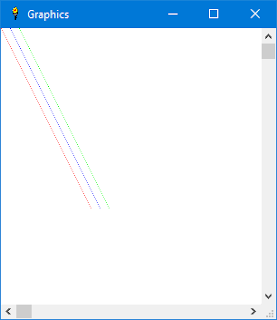
PSET x, y, "color"To do this we need to add some code to our case "pset" block:
CASE "pset"
IF GWINOPEN = 0 THEN
E$ = "PSET error - Graphic window is not open"
GOTO [Ready]
END IF
GOSUB [GetExpression]
IF E$<>"" THEN [Ready]
PSETX = N
GOSUB [GetChar]
IF C$ <> "," THEN
E$= "Comma expected after x parameter"
GOTO [Ready]
END IF
C = C + 1
GOSUB [GetExpression]
IF E$<>"" THEN [Ready]
PSETY = N PSETCOLOR$ = "black"
GOSUB [GetChar]
IF C$ = "," THEN
C = C + 1
GOSUB [GetStringLiteral]
IF E$ <> "" THEN [Ready]
PSETCOLOR$ = B$
END IF
#GWIN "color "; PSETCOLOR$
#GWIN "down ; set "; PSETX; " "; PSETY
GOTO [FinishStatement]
The way this works is that it will look for a comma and a string expression after it sets PSETX and PSETY. If there is no comma it will skip over the part that gets a color parameter, so the default color will be black in that case.
The string will be the name of a valid Liberty BASIC color, for example red, blue, green, black, etc. The following code is stolen from the routine that parses for the PRINT statement. In a later post we will incorporate this into the PRINT code by calling it as a subroutine so that we won't have the same code twice.
[GetStringLiteral]
GOSUB [SkipSpace]
GOSUB [GetChar]
IF C$=G$ THEN
B$=""
[NextStringMember]
C = C + 1 : C$=MID$(A$,C,1)
IF C$="" THEN
E$="Unterminated string"
RETURN
ELSE
IF C$<>G$ THEN
B$=B$+C$
GOTO [NextStringMember]
END IF
END IF
C = C + 1 : C$=MID$(A$,C,1)
IF C$=G$ THEN
B$=B$+C$
GOTO [NextStringMember]
END IF
END IF
RETURN
So we call the [GetStringLiteral] subroutine and check E$ for an error. If there is none then we set PSETCOLOR$ to the value of B$ as shown here.
GOSUB [GetStringLiteral]
IF E$ <> "" THEN [Ready]
PSETCOLOR$ = B$
END IF
#GWIN "color "; PSETCOLOR$
Then we add a drawing command like so to set the color:
#GWIN "color "; PSETCOLOR$
Here is a sample that uses PSET with color!
5 graphicwin
10 pset x, y, "red"
20 pset x + 10, y, "blue"
30 pset x + 20, y, "green"
40 x = x + 1
50 y = y + 2
60 if x < 100 then goto 10
And here is a screenshot!

Wednesday, January 13, 2016
Liberty BASIC file type association
Liberty BASIC doesn't map the BAS file extension to itself when it is installed. This is because I didn't want to be so presumptuous as to steal a common file type away from another version of BASIC that might be installed.
So, because there is a bug in Windows which makes it really hard to remap a file extension and there have been discussions about this in the Liberty BASIC forum at conforums.com one of our member Chris Iverson (thanks Chris!) has contributed some Liberty BASIC code to solve this problem.
Click to see thread in the forum
Enjoy!
So, because there is a bug in Windows which makes it really hard to remap a file extension and there have been discussions about this in the Liberty BASIC forum at conforums.com one of our member Chris Iverson (thanks Chris!) has contributed some Liberty BASIC code to solve this problem.
Click to see thread in the forum
Enjoy!
Sunday, January 10, 2016
Lunar lander revisited
Liberty BASIC comes with a nice introduction to video games called lander.bas.
- It's a good example of a timer driven game.
- It uses sprites which are actually generated on the fly using turtle graphics.
- It also shows proper technique of structured programming.
So I have some ideas that I am thinking about implementing to update it and make it an even more complete video game example:
- Add sound effects including ambient sounds, rocket motor noise and crash explosion.
- Animate the rocket motor so you can see rocket exhaust coming out.
- Add some flying space junk sprites that you need to avoid while trying to land.
- Add a colored starfield in the background.
Looking forward to this! Check back for updates!
Friday, January 08, 2016
Tiny BASIC part 4 - Adding a PSET statement
Okay, now we are ready to add a PSET statement for drawing pixels. Today we will simply add the ability to draw a single black pixel at a time. Next time we will add color!
Here is the code to accomplish this. This is just another SELECT CASE block to add after the one we added for the GRAPHICWIN command.
This was a bit tricky to write because there isn't really any documentation with the original Tiny BASIC source code, but by looking at the code for the other statements I think I figured it out correctly. It does seem to work.CASE "pset"
IF GWINOPEN = 0 THEN
E$ = "PSET error - Graphic window is not open"
GOTO [Ready]
END IF
GOSUB [GetExpression]
IF E$<>"" THEN [Ready]
PSETX = N
GOSUB [GetChar]
IF C$ <> "," THEN
E$= "Comma expected after x parameter"
GOTO [Ready]
END IF
C = C + 1
GOSUB [GetExpression]
IF E$<>"" THEN [Ready]
PSETY = N
#GWIN "down ; set "; PSETX; " "; PSETY
GOTO [FinishStatement]
The syntax for the new statement is PSET x, y
Let me explain what it does.
- First check to see if the graphic window is open. If it isn't then set E$ to be an error string. Then GOTO [Ready]. This will display the error.
- Then get the next expression using GOSUB [GetExpression]. This unleashes the expression parser which is easily the largest and most complex part of the Tiny BASIC source code. Then it checks for an error using IF E$<>"". If E$ does contain an error, then GOTO [Ready].
- Okay so got this far, so set PSETX to be what was in N, which is the result of the call to [GetExpression].
- Now get the next character, which we expect to be a comma to separate the x and y values. If the next character is not a comma, set E$ to be an error and GOTO [Ready].
- Now advance C one character by adding 1 to it. We do this because we found the expected comma, and now we need to skip over that so that we can get the next expression for our y value.
- Get the next expression using GOSUB [GetExpression]. Test E$ for an error and GOTO [Ready] if there is one.
- Get the value of N and put it into the variable PSETY.
- Finally, draw the pixel in the graphics window!
Here is the sample Tiny BASIC program that uses the PSET statement:
10 graphicwin
20 pset x, y
30 x = x + 1
40 y = y + 2
50 if x < 200 then goto 20
And here is the output of the program!

Thursday, January 07, 2016
Run BASIC Revisited - The easiest web development system on Earth
I got an inquiry yesterday about Run BASIC asking about what is special about it. The essential concept is that it is an all-in-one BASIC web application server. You can use it to create a dynamic web site, or to host in-house applications for your business or school, or use it to control your home. The possibilities are pretty much endless.
Here is a link to a white paper about Run BASIC.
http://www.libertybasic.com/RunBASICBreakthrough.pdf
Here is a link to the Run BASIC community forum.
http://runbasic.proboards.com/
Here is a link to a white paper about Run BASIC.
http://www.libertybasic.com/RunBASICBreakthrough.pdf
Here is a link to the Run BASIC community forum.
http://runbasic.proboards.com/
Wednesday, January 06, 2016
Tiny BASIC part 3 - Adding GRAPHICWIN statement
We are going to add GRAPHICWIN and PSET statements to Tiny BASIC.
Let's start with the really easy one. We will add a case "graphicwin" block to the end of the select case blocks that we examined in the last post. Here is what it looks like. The new code is in bold red.
CASE "let"So when you run Tiny BASIC and type the command graphicwin and press Enter it will open a small graphics window. When it does this it also sets the GWINOPEN flag to 1 to that we can check it if the program tries to open another graphics window. Only one graphics window will be allowed at a time.
GOSUB [GetLabel]
IF E$<>"" THEN [Ready]
CASE "graphicwin"
IF GWINOPEN = 1 THEN
PRINT "Graphics window is already open."
ELSE
GWINOPEN = 1
OPEN "Graphics" FOR graphics AS #GWIN
END IF
GOTO [FinishStatement]
END SELECT
The other thing that we want to do it close the graphics window and reset GWINOPEN to 0 if the program is started using the RUN statement.
So, we need to add the following code into the case "run" block. Here is how that code should look. The new code is in bold red.
CASE "run"So now the program will always start off in a clean state each time it is run!
IF GWINOPEN = 1 THEN
CLOSE #GWIN
GWINOPEN = 0
END IF
FOR I=27 TO 52 : A(I)=0 : NEXT I
L=27 : C=1
GOTO [FinishStatement2]
In our next post we will figure out how to add a PSET statement so we can draw some graphics!
Monday, January 04, 2016
Tiny BASIC part 2 - Adding new statements
This is part 2 of a series on extending tiny basic.bas which is an example that comes with Liberty BASIC v4.5.0.
In order to add some graphics capability I want to suggest two new commands just to start.
GRAPHICWIN width, height and PSET x, y, color$
These will enable us to open a window to draw in, and also to draw pixels of a specific color at a given x, y position. This will be a crude start, but it will be instructive because it will show the reader how to extend Tiny BASIC to do what is desired.
The first thing to do is figure out where in the code Tiny BASIC parses commands so we can add some more. The code below is the routine that does this. If you look carefully you will see a SELECT CASE statement and then a CASE statement for each Tiny BASIC command.
More later.
In order to add some graphics capability I want to suggest two new commands just to start.
GRAPHICWIN width, height and PSET x, y, color$
These will enable us to open a window to draw in, and also to draw pixels of a specific color at a given x, y position. This will be a crude start, but it will be instructive because it will show the reader how to extend Tiny BASIC to do what is desired.
The first thing to do is figure out where in the code Tiny BASIC parses commands so we can add some more. The code below is the routine that does this. If you look carefully you will see a SELECT CASE statement and then a CASE statement for each Tiny BASIC command.
More later.
[NextStatement]
GOSUB [GetLabel]
IF E$<>"" THEN [Ready]
SELECT CASE D$
CASE "if"
GOSUB [GetExpression]
IF E$<>"" THEN [Ready]
IF N<1 font="" then="">
B$=A$(L) : C=LEN(B$)+1
GOTO [FinishStatement]
END IF
GOSUB [GetLabel]
IF E$<>"" THEN [Ready]
IF D$<>"then" THEN
E$="'THEN' expected"
GOTO [Ready]
END IF
GOTO [NextStatement]
CASE "rem"
B$=A$(L) : C=LEN(B$)+1
GOTO [FinishStatement]
CASE "input"
GOSUB [GetVar]
IF E$<>"" THEN [Ready]
INPUT N : A(V)=N
GOTO [FinishStatement]
CASE "print"
[Print]
GOSUB [SkipSpace]
GOSUB [GetChar]
IF C$=G$ THEN
B$=""
[NextChar]
C = C + 1 : C$=MID$(A$,C,1)
IF C$="" THEN
E$="Unterminated string"
GOTO [Ready]
ELSE
IF C$<>G$ THEN
B$=B$+C$
GOTO [NextChar]
END IF
END IF
C = C + 1 : C$=MID$(A$,C,1)
IF C$=G$ THEN
B$=B$+C$
GOTO [NextChar]
END IF
PRINT B$;
ELSE
GOSUB [GetExpression]
IF E$<>"" THEN [Ready]
B=N1
IF B=N THEN
PRINT N;"*";
ELSE
PRINT N;
END IF
END IF
GOSUB [SkipSpace]
GOSUB [GetChar]
IF C$="," THEN C = C + 1 : GOTO [Print]
GOSUB [SkipSpace]
GOSUB [GetChar]
IF C$<>";" THEN
ELSE
C = C + 1
END IF
GOTO [FinishStatement]
CASE "clear"
FOR I=27 TO 52 : A(I)=0 : NEXT I
GOTO [FinishStatement]
CASE "run"
FOR I=27 TO 52 : A(I)=0 : NEXT I
L=27 : C=1
GOTO [FinishStatement2]
CASE "goto"
GOSUB [GetExpression]
IF E$<>"" THEN [Ready]
IF E>=N THEN L=27
C=1 : T=N
[NextGoto]
IF L=126 THEN
E$="Line not found"
GOTO [Ready]
END IF
GOSUB [GetNumber]
IF N=T THEN E=N : GOTO [NextStatement]
L = L + 1 : C=1
GOTO [NextGoto]
CASE "new"
FOR I=27 TO 125 : A$(I)="" : NEXT I
FOR I=27 TO 52 : A(I)=0 : NEXT I
IF E=0 THEN [FinishStatement]
GOTO [Ready]
CASE "cls"
CLS : GOTO [FinishStatement]
CASE "help"
FOR I=9 TO 18
B$=A$(I) : PRINT B$
NEXT I
GOTO [FinishStatement]
CASE "mem"
B=126
FOR I=27 TO 125
diffI = 152 - I 'Cheating here
B$=A$(diffI) : IF B$="" THEN B=diffI
NEXT I
B=126-B : PRINT B;"*";
PRINT " lines free"
GOTO [FinishStatement]
CASE "end"
GOTO [Ready]
CASE "bye"
GOTO [ExitTinyBAS]
CASE "list"
GOSUB [GetNumber] : T=N : A=L : I=C
IF T=0 THEN
GOSUB [GetLabel]
IF E$="" AND D$="pause" THEN I=C
E$=""
END IF
FOR L=27 TO 125
C=1 : GOSUB [GetNumber]
B=(T=0) OR (N=T)
IF B=TRUE THEN
IF A$<>"" THEN
PRINT A$
IF D$="pause" THEN
B = (L-26) mod 10
IF B=0 THEN PRINT "Pause..."; : INPUT AAA$
END IF
END IF
END IF
NEXT L
L=A : C=I
GOTO [FinishStatement]
CASE "save"
PRINT "SAVE, TBD"
CASE "load"
PRINT "LOAD, TBD"
CASE "let"
GOSUB [GetLabel]
IF E$<>"" THEN [Ready]
END SELECT
Thursday, December 31, 2015
More on getting started with Liberty BASIC
In addition to the resources I mentioned the other day, please do not overlook our great online community of users.
There are two large forums where you can learn a lot from friendly, knowledgeable people about all kinds of things.
First the forum at Conforms. This great forum is organized by topic, which is really nice. Here's the link:
http://libertybasic.conforums.com
Secondly there is Yahoo Groups! What's nice about this site is that you can subscribe to get emails, and you post to the group by email. Here is the link:
http://groups.yahoo.com/group/libertybasic
People do amazing things with Liberty BASIC, and these are the places where these people hang out.
See you there!
There are two large forums where you can learn a lot from friendly, knowledgeable people about all kinds of things.
First the forum at Conforms. This great forum is organized by topic, which is really nice. Here's the link:
http://libertybasic.conforums.com
Secondly there is Yahoo Groups! What's nice about this site is that you can subscribe to get emails, and you post to the group by email. Here is the link:
http://groups.yahoo.com/group/libertybasic
People do amazing things with Liberty BASIC, and these are the places where these people hang out.
See you there!
Tiny BASIC revisited
Liberty BASIC comes with an implementation of Tiny BASIC which is extremely similar to the BASIC that came with the old Radio Shack TRS-80. Remember that computer? Some of us do. :-)
This is a very limited version of BASIC, but it has some strengths.
This is a very limited version of BASIC, but it has some strengths.
- Simplicity - Not much to learn
- Interpreted - This is an interactive interpreter
- Source code - You can modify the language
So, since Tiny BASIC can be modified by pretty much anyone who knows a little BASIC, I am starting a series where I will extend the language and show how to do it.
First we will focus on graphics! More to come so stay tuned!
Wednesday, December 30, 2015
Doing pixel manipulation in Liberty BASIC
One of the members of the Liberty BASIC community posted a cool example of doing pixel graphics in Liberty BASIC. It is instructive because it is short and it shows how to effectively use Windows API calls to work with graphical images.
Here is a link to the post including a code example and a screenshot of the output.
Tuesday, December 29, 2015
How to get started with Liberty BASIC
I got an email today from someone who was frustrated trying to figure out how to get started with Liberty BASIC. This seemed like good blogging material. :-)
Here is a start on the subject of getting started.
Try it - Download the trial software and install it. It works on pretty much all versions of Windows that run on laptops and desktop PCs. We don't support Windows Server but it may run.
Here's the download link http://www.libertybasic.com/download.html
Liberty BASIC comes with a tutorial. Once you start up Liberty BASIC look at the Help menu for the tutorial and the help documentation
There is a softcover book that you can purchase at Amazon's site.
Here is the link for the book:
http://www.amazon.com/Beginning-Programming-Liberty-BASIC-Gundel/dp/0557228115
Here is a start on the subject of getting started.
Try it - Download the trial software and install it. It works on pretty much all versions of Windows that run on laptops and desktop PCs. We don't support Windows Server but it may run.
Here's the download link http://www.libertybasic.com/download.html
Liberty BASIC comes with a tutorial. Once you start up Liberty BASIC look at the Help menu for the tutorial and the help documentation
There is a softcover book that you can purchase at Amazon's site.
Here is the link for the book:
http://www.amazon.com/Beginning-Programming-Liberty-BASIC-Gundel/dp/0557228115
Subscribe to:
Posts (Atom)
